• Future of ReactJS and How it fits into the JavaScript Ecosystem

    In 2023, React will be the best JavaScript framework for front-end web app development. In addition, Reactjs framework functionalities and features have multiple tools that will make an app the best. However, due to the rapid pace of change in the world of javascript, it is necessary to know about the future of ReactJS and how it fits into the vast context of front-end development.

    What is JavaScript?

    Javascript is the scripting language utilized to build and control the dynamic of web app content. It consists of interactive forms, photo slide shows, and animated graphics. Also, React framework works with web app animation parts where you can view the things to move, refresh or modify on your screen without manually reloading a page.

    Therefore, it is a simple and easy coding language that includes a web application’s animated and interactive features on top of the primary, static structures developed by programming languages like HTML and CSS.

    What is a JavaScript library?

    Javascript plays a crucial role in web application development. Hence, you need JavaScript to perform repetitive functions such as stock animation effects and the autocomplete search bar features. Thus, recoding these functionalities is massive; therefore, Javascript libraries come in to prevent this annoying situation.

    Javascript libraries are the collection of pre-written JavaScript, which is utilized for simple and easy Javascript tasks. It also permits you to manually eliminate the coding time written by a programmer.

    Now, let’s see the multiple Javascript libraries and add them ReactJS is one of them.

    Also Read: React JS vs Vue.js! Which is better for Javascript Framework?

    What is ReactJS?

    ReactJS is the open-source, component-based JavaScript library broadly used to develop reusable user interface components for web and mobile application development.

    React is gaining popularity and is mainly used in the JavaScript framework. Moreover, it has excellent unique features, including React hooks’ great features and functionalities and allows you to write the functional components. Several resources are built around React and allow React engineers to work efficiently.

    Moreover, a JavaScript ecosystem is proven to be highly dynamic. The latest software packages and tools are arising daily and give developers several options. Hence, libraries are no exception!

    ReacJS is well-known when it comes to Javascript libraries. So, the business is looking to hire ReactJS developers who will engage and give the best with the trending technology in the industry.

    However, the front end plays a vital role in the success of any modern business application. React’s robust library steadily gaining attraction amongst developers and enterprise owners. Therefore, ReactJS has become a great web app development tool due to its benefits.

    Furthermore, React delivers efficiency and has high code reusability. Create a scalable structure for the ReactJS applications, which is faster than other frameworks or libraries.

    Most used frameworks by developers worldwide as of 2022

    Node.js will overtake React.js to become the most used framework among software developers worldwide as of 2022. As per the research, 47.12 % of the respondents use Node.js, while 42.62% utilize React.js.

    Image source : statista.com

    A web framework, sometimes known as a web application framework, supports the overall software development of web applications. These web frameworks are utilized to automate menial activities typically performed within web development. In other words, it simplifies the web development process and makes creating a website easy.

    Why use ReactJS?

    ReactJS is a technologically advanced, responsive, and risk-free way to make interactive and intuitive front-end interfaces. It is proven safe and secure technology to make your subsequent enterprise applications. Therefore, if you decide to approach with best ReactJS development company, then you are on the right track for your project.

    ReactJS has a rich ecosystem with the most tools like Redux or flux and Node.js on the back-end development.

    React’s primary component and abstraction take in the data and will illustrate the DOM without any disadvantages. Furthermore, the scalable ReactJS architecture pattern makes it easy for engineers to build the states in the DOM, making React components easier to test.

    ReactJS provides the data regarding a snippet of the code and needs the section to make the particular bit of the user interface. Hence, making an app development procedure accessible and eliminating the bugs. Hence, ReactJS is one step ahead in open-source JavaScript solutions.

    1. ReactJS for front-end development

    This section describes the significant advantages of ReactJS for front-end development. Most companies in front-end development have used reactJS features and advanced functionalities.

    2. React uses plain JavaScript

    React has the JavaScript exports the class r function. If you have npm installed, you have to just run the ‘npx create-react-app app-name with this function. Hence, you can easily add the React component by developing the new JavaScript file, which exports a function or class inside the ‘src’ folder.

    	
    export default function Component() {
    return(<h1>Hello World</> )
    }
    

    The above code shows how easy it is, to begin with, ReactJS; you have only to export the function that returns JSX.

    JSX in React is the extension to JavaScript, allowing developers to write HTML in JavaScript files. The utilization of jSX aids in keeping the logic of components and UI in only one file without bloating it. JSX also helps interpret JavaScript expressions and statements by wrapping them in curly braces; it complies first and more rapidly than the actual JavaScript written outside the JSX.

    3. Simple learning curve

    Each new and latest technology needs less time and effort to learn the language. Hence, allocating a similar time to learning the other framework is a time-consuming task. Therefore, React has an easy-to-learn user interface. Hence, working on React is relatively easy, and if you have a fantastic knowledge of the JavaScript library, then it is good.

    Hence, if you have the JavaScript development team to work on the project, you can switch to embedding React within your organization’s tech stack, and it will kick off the phases.

    4. Exceptional Reusability

    Developing and including the components in your application is a great way to begin. Hence, everyone wants to view the customization and keep their work unique to stand out. However, as project length and time goes beyond reach, rewriting all the small components is nothing but overhead.

    Hence, it grants ReactJS developers the reuse of existing components throughout the application. You can also utilize them, encapsulate or wrap a method and find them reliable and suitable for the projects.

    5. Declarativeness

    ReactJS is developer friendly as whenever the view or component requires to build, then the library will only ask what has to be deployed. Hence, it increases the speed of application development and makes the debugging and deployment process easy. It also provides the flexibility and ease experienced by coders when working on React technology.

    6. Slices Abstraction

    Every front-end development framework or library provides the facility of abstraction in its development phase. The specific architecture makes it complicated for a developer to keep up with the development task. Hence, React gives you your choice of app architecture and designs the app in such a manner as per your project requirement.

    7. Rich Ecosystem of tools and developers

    ReactJS has a feature-rich ecosystem for domain expertise. The library has built-in tools that will simplify the procedure of developing, designing, and building the application. However, with the help of ready-made charts, modules, graphics, and documentation tools, the experts can finish an entire development procedure in no time with the support of existing components. Moreover, these tools are technically rich and have all the features, so one must incorporate them within the application.

    8. Supports functional or class-based components

    ReactJS gives more than one approach to composing your UI. A class component is a class that will just extend the React component libraries. It comes with the render method and is called to develop and return your UI.


    import { Component } from "react";
    class App extends Component {
    render() {
    }
    let message
    return (
    );
    =
    'Hello World!';
    <h1>{ message }</h1>
    }
    export default App;
    

    You can declare and export the function that returns your UI in the functional components. Hence, it gives the flexibility to select the style in which you are convenient and comfortable.

    Also Read: Benefits of using ReactJs for Web Development

    Well-known React combinations that are looking for a while to hire React development company

    A popular combination of back-end technologies is described below and has proven the record of supporting multiple domains and industries with ultra-modern tech solutions. So, see some of the combinations while hiring the best react app development company for your project.

    1. React with Node

    JavaScript gives the scope as a full-stack development package. So, whenever you are using ReactJS for front-end development and Node.js in the back-end for your enterprise mobile app development, you will be surprised to view the excellent functionalities of your business app. Hence, it ensures scalability and authentication in your application with the whole Javascript tech stack.

    2. React with PHP

    As PHP is the widely used language that supports various websites, merging this back-end language with React gives many advantages. PHP is easy to learn and can be used in React app development. This language has a rich set of libraries and frameworks to accomplish many back-end tasks. So, while using PHP and React, programmers get the benefit of enormous community support.

    3. React with Laravel

    A combination of ReactJS and Laravel will give the best results, proven to be a great combination for developing the SaaS product. React also permits you to make an SEO-friendly application. In contrast, Laravel can support it with its built-in libraries and data migration to create the feature-rich enterprise ReactJS architecture.

    Why ReactJS for front-end web app development?

    React has a massive colony of applications. If you are stuck in the problem of ReactJS and its applications, here are some of the use cases to understand why it is used in web app development.

    1. Single-Page Applications

    ReactJS has eliminated the requirement to wait for a website to reload each time when any task is performed. In this way, it gives better performance with less bandwidth.

    2. Large-scale objects

    React will follow a component-based approach to design the same for apps with several workflows and a complicated server side.

    3. Fantastic UI and intuitive apps

    For apps facing significant complexities over a performant UI, rEcat will simplify a process through its functionalities and features.

    4. E-commerce applications

    E-commerce apps use the ReactJS navigation tools and design components. It will help you to improve the performance of eCommerce apps.

    5. IoT applications

    An app designed with the React library’s core features and performance in mind, server-rendering, and the virtual DOM permits you to create large-scale and high-performing IoT apps faster.

    Schedule an interview with React developers

    Conclusion

    I hope this information relayed to ReactJS development is clear from this blog. Hence, if you are planning to use ReactJS in your project, you will need the help of React developers who can note the specific requirements and ensure the delivery of a project with the desired result. Bosc Tech Labs is the best web and mobile app development company that has always strived hard to get clients results beyond their exceptions.

    Besides this, hundreds of organizational benefits and improved efficiency have proven to be the reasons big business brands adopt and integrate ReactJS in its product and services. The cost and resources are worth upgrading the existing service with ReactJS app development. It has the interactive and intuitive front-end interfaces of ReactJS development services and is known for providing an unmatchable user experience for web and mobile app development.

    Frequently Asked Questions

    1. Why is React the most used framework in 2023?

    Compared to the other front-end frameworks, React code is easy to maintain and flexible because of its modular structure. Due to its flexibility and reliability, it saves a considerable amount of time and cost for businesses.

    2. What makes React unique?

    React will build interactive UIs. With the help of designing simple views for each state in your application, it will efficiently update and render the just right components when the data is being modified. Hence, the declarative ways make the code more predictable and easier to debug.

    3. Why do developers make use of React hooks in their development?

    With the help of hooks, you can extract the stateful logic from the components to be tested independently and reused. Hooks also allow you to reuse the stateful logic without changing the component hierarchy. Hence, sharing the hooks among components or with the community is easy.


    Book your appointment now

  • Scroll To An Element On Click In React

    Scrolling involves the elements in React that are done even in JavaScript. Normally, scrolling is a sliding effect or movement in the text, image, and graphics. It is quite different from that of the frameworks. It is efficient to enable scrolling while developing the WebPages. These can be either clicked, or they can be automatically enabled in React.

    The scrolling process can be enabled on both the horizontal and vertical positions in the display. It is also quite convenient to hire React engineer to add the scrolling element in React. You can also easily select the DOM element for updating the scrollable element, such as the body.

    Scrollintoview Function

    The scrollTo method or scrollTop position manually can also be used in the process. These automatically match the DOM elements on the screen and assure to improve stability. These are quite an easier way to improve the stability to the maximum level.
    scrollIntoView function is one of the simple ways to scroll the element in React to make development faster. This element requires the DOM for the useRef, or you can also select the DOM directly. There are also many methods that can be useful for enabling the scroll section with the button.

    scrollIntoView method also accepts the optional parameters for controlling scroll animation. These also involve focusing on various elements to the extent. Default scrolling is also enabled for the webpage or part of the site areas where it is required.

    Scroll An Element On Click In React#

    Scrolling the element on click with React is quite a simple process. It is quite convenient for setting the ref pop-on element that you require to scroll. You can easily set the onClick prop across the element to the maximum. Call the scrollIntoView() method when the element is clicked on the ref object.

    App.js
    import {useRef} from 'react';
    export default function App() {
      const ref = useRef(null);
      const handleClick = () => {
    ref.current?.scrollIntoView({behavior: 'smooth'});
      };
      return (
    <div>
    <button onClick={handleClick}>Scroll to element</button>
    <div style={{height: '155rem'}} />
    <div ref={ref}>Some content here</div>
    <div style={{height: '155rem'}} />
    </div>
      );
    }
    

    useRef() hook will be involved with passing the initial value for the argument. Normally, hook returns will be mutable ref objects, and these are enabled with the .current property initialized for passing the arguments. It is convenient for accessing the current property in the ref object for getting access to div elements. These are suitable options for setting ref prop even without any hassle.

    React sets the .current property for the ref object when it is passed on the ref prop in elements. For example,

    corresponds with the DOM node. It will be quite a convenient option for learning the methods for scrolling the elements in React.

    Scrolling the elements in React is quite an efficient option compared to that of other frameworks. These also involve various elements and scroll added by clicking the button or automatically.

    Also Read: How to Scroll to a List Item in React?

    Element.Scrollintoview() Method

    The Element.scrollIntoView() method is available in the HTML element interface, as well as React refs or references. These can be easily created either using the useRef() hook or even using the createRef() method. You have the better option to easily take the help of React Experts to develop progressive web applications based on your requirements. Scroll to an Element using the Element.scrollIntoView() Method in React can be easily listed below

    the element.scrollIntoView(align)
    

    The element.scrollIntoView() accepts the boolean value or object

    element.scrollIntoView(alignToTop);
    

    These involve alignToTop as a Boolean value.

    element.scrollIntoView(options);
    

    Normally, this method will easily accept single arguments. scrollIntoView() method scrolls with elements that can be visible in all areas of the browser.

    Types Of Properties Scroll To A New Element In React

    Normally, the DOM element is useful to scroll the view, so it is convenient to run any problem. DOM elements can be easily created in response to state changes with React. There are 3 important properties available such as

    1. block:

    The block is defined as the vertical alignments. These accept the 4 values called as the

    • start
    • end
    • center
    • nearest

    2. behavior:

    The behavior property is called the transition animations. These accept the 2 values called as the

    • auto
    • smooth

    3.inline:

    The inline property involves horizontal alignment in the process. These accept 4 important values like

    • start
    • end
    • center
    • nearest

    Example

    var element = document.getElementById("box");
    element.scrollIntoView();
    element.scrollIntoView(false);
    element.scrollIntoView({block: "end"});
    element.scrollIntoView({behavior: "smooth", block: "end", inline: "nearest"});
    

    Setting the onClick prop can also be added with the button element, and it can be easily analyzed with the function called handleClick. scrollIntoView method can be easily used in the handleClick function for scrolling the div elements. These can be easily added with ref prop during its functions.

    Behavior property also denotes that scrolling is enabled to animate it smoothly. The default value enabled with behavior property will be the Auto feature. scrollIntoView() method invokes the elements when the button is clicked. Normally, this element can be visible to the user.

    Also Read: Understanding React Native New Architecture in 2023

    How To Scroll To The New Element In React?

    DOM elements can be easily created in response to changes in React. It gives a better referent as the DOM element for scrolling the view. For example, the problem can be easily listed, and it gives scrolling as the last element. The list is rendered based on the numerous array of states.

    A new DOM element will not be rendered if the scroll down of the last element is processed at the bottom. For example, the flushSync method is quite an effective way of enabling the react-dom to update DOM immediately extensively. It involves the component’s state is updated automatically.

    import { flushSync } from 'react-dom';
    

    Schedule an interview with React developers

    Conclusion

    JavaScript API provides a better way for scrolling the elements through the scrollIntoView method. These don’t provide fine-grained control, but these are independent on several OS. You can easily install a terminal inside the ReactJS project and install react-scroll. However, it is now possible to scroll an element on the click in React by utilizing a react-scroll package. This package allows the React lifecycle components to scroll the particular part or position within the page. It has the feature of scroll-to-top whenever the user taps on the button. Hence, the react-scroll package delivers a simple and effective way to scroll the element in React app development.

    From the above-explained example, you got an idea of how to scroll the element on click in React development. Sow, what are you waiting for? Connect with the best web and mobile app development companies like Bosc Tech Labs to execute this procedure. These well-known experts will help you to complete this task at the correct time and approach.


    Frequently Asked Questions(FAQs)


    1. How to scroll to the top on the button click in React?

    addEventListener property and set the state visible to true. However, the state is utilized to view and Scroll to the top icon to the user. Thus, when the user clicks on this specific icon, a function scrollToTop gets triggered as an onClick() event that helps to scroll on pages smoothly to the top.

    2. What is the use of scrollable control?

    The scrollableControl class will behave as a base class for controls that need the ability to scroll. However, to enable the control to appear on the scroll bars as needed, set the AutoScroll property to actual and set the AutoScrollMinSize property to desired size.

    3. What is a scrollable ResultSet?

    Scrollable means that once a ResultSet object has been built and traversed via the fetched records in any of the directions, that is, backward and forward. Hence, it allows the ability to read the last, following, and previous records.

    4. How do I set the scroll view in React?

    To put the various views in the scroll view, one must build a group as the direct child and then define the many views internally. Hence, the scroll view supports vertical scrolling only to build the horizontally scalable view, and HorizontalScrollView is used.


    Book your appointment now

  • Flutter Vs. React Native: Which is Best For your Project in 2026?

    Mobile application development is growing at a very fast pace of time. The new lifestyles and the latest methods of communication have raised the demand for mobile apps. But it is creating the app for iOS and Android, meaning you need two different teams with various skill sets. However, with the help of the cross-platform mobile app development framework, it is easy to develop an app for both platforms with a unified codebase.

    Cross-platform mobile apps platforms such as Google’s Flutter and Facebook’s React Native are two of the latest topics to debate when selecting hybrid app development platforms. But deploying the app on Apple Store or Google Play Store is the need of every business. However, shipping in the app market and selecting the correct technology stack is the most important step to take wisely. However, when we discuss the two most renowned platforms, React Native and Flutter, it is very difficult to find the most suitable for your project. But before going on any discussion, let’s discuss both these frameworks in detail.

    What is Flutter?

    Flutter is an open-source, cross-platform mobile application development framework that uses Dart language. As Google introduces Dart and Flutter, the business industry uses this framework to create robust and big-size enterprise apps easily. However, due to its huge capability of cross-platform app development, Flutter has gained much popularity in a very short time. Hence, it has given birth to many mobile apps which are getting appreciated by people.

    What are the benefits of Flutter App Development?

    1. Hot Reloading

    The hot reloading feature perfectly matches Flutter’s nature, which is the major advantage of utilizing Flutter for streamlining cross-platform development. However, with the help of this feature, the programmers can make the changes quickly, make instant tweaks, and then merge the updated elements. Hence, this approach has necessarily streamlined the development process and will make bug fixing easier.

    2. Embedded Application Builder

    The built-in app builder is another benefit of Flutter app development. Hence, this tool has many pre-developed UI elements that the developers must merge and customize. An app builder is flexible and allows creative and non-patterned ideas.

    3. Codebase Sharing

    Flutter-build applications can share the code between iOS, Android, and various other platforms by eliminating the requirement to rewrite it from scratch. Hence, this feature makes Flutter a great choice for MVP development. With this, the developers can deliver the app with a close-to-native look, test it with the targeted audience, and decide on the necessity of making a native application.

    4. High Productivity

    As Flutter is cross-platform, you can use a similar codebase for the iOS and Android apps. Hence, it will save time and resources.

    5. Great Performance

    Dart compiles into the native code, and there is no requirement to access the OEM widgets, as Flutter has its own. There is less mediated communication between the app and the platform, as Flutter is the SDK that gives reactive views without needing a JavaScript bridge. Hence, it contributes to the fast application startup times and the very few performance issues.

    6. Compatibility

    As the Flutter widgets are part of the app rather than the platform, you will get less experience or no compatibility issues on the various OS versions. Hence, in turn, less time is spent on testing.

    What is React Native?

    React Facebook launched Native. It is the most preferable and well-known cross-platform mobile app development framework. Hence, React Native uses JavaScript and simplifies Android and iOS app development with a single codebase.

    What are the major benefits of React Native App Development?

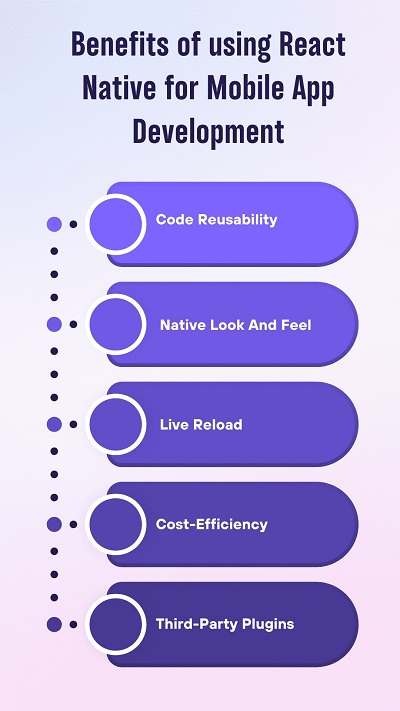
    1. Code Reusability

    The major benefit of React Native is that programmers are not required to make different codes for multiple platforms. However, approximately 95% of the code can be reused between two platforms, which helps to increase development speed and efficiency considerably. Thus, you will get a faster time-to-market with fewer maintenance efforts.

    2. Native look and feel

    React Native Components merges the blocks from a native user interface with their JavaScript and gives an app a native-like appearance. Moreover, by creating the blocks for the same iOS and Android, the look and feel of the app will be the same across the two platforms.

    3. Live Reload

    The live reload feature of React native permits you to view and work with the changes in real-time. You can fix the code while an app is loading and it reflects in the application with the automatic reload feature. Hence, reload the particular change area to save time on a compilation.

    4. UI Focused

    React Native makes use of the React JavaScript library to create app interfaces that are fast and responsive. It has great rendering abilities and utilizes the component-based approach, making it easy to make simple and complicated UI designs.

    Also Read: Top 10 Most Used React Component Libraries in 2022

    5. Cost-Efficiency

    As code is reusable in React Native, it helps you save up to 40% of development costs. Hence, you do not have to hire the two various Android and iOS developers to make the application. Therefore, the pre-built components in React Native will fasten the development process.

    6. Third-Party Plugins

    Developing the app from scratch is expensive; React Native gives several third-party plugin options, including JavaScript-based and native modules. Therefore, the third-party plugins alienate a requirement for the particular web view functions, and it helps to enhance an app’s functionality and performance.

    React Native Vs. Flutter: Which is the Best Cross Platform Mobile App Development Framework In 2023?

    Both React Native and Flutter is the renowned platform for cross-platform mobile app development. Hence, both have their benefits. So, let’s compare Flutter and React Native with the different criteria.

    1. Programming Language

    React Native uses JavaScript to make the user interfaces. It is easy for web developers to work with React Native because of its robust popularity of JavaScript. JavaScript is the highly preferable and the selected programming language among the programmers, and also it simplifies training the development team to work on React Native.

    On the contrary, Flutter uses the Dart language, which Google launches. As it is a client-centric language, Dart gives various benefits. Hence, Dart enables the assembling of famous OOP languages such as C++ and Java. You will easily get the command over Flutter if you have complete knowledge and understanding of any OOP language.

    2. Architecture

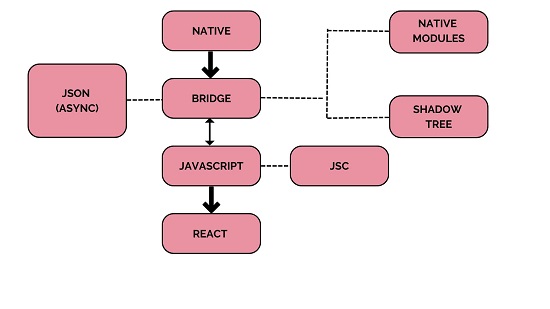
    In React Native architecture, JavaScript builds the bridge between the Native language and JavaScript. It works through the two-sided conversation by sending the JSON message. Hence, due to an asynchronous message transmission, it needs a smooth user interface for the app. However, React Native app development has the chance of lagging UI in the end as the bridge affects rendering speed.

    In Contrast, Flutter is a package that does not need any bridge to communicate with the native components. Hence, it has everything within itself, such as the Cupertino framework, materials design, etc. The Flutter benefit makes an app more predictable and robust to perform on various platforms than React Native.

    3. Installation and Configuration

    React Native gives an easy configuration process. You can Install React Native CLI globally with the help of the command line. In addition, you need to install Yarn and NodeJS as the package manager. You can install Flutter by downloading the binary for the specific mobile platform and adding it to your PATH variable. Hence, it can be easily done by the command line. Therefore, Flutter goes one step down in the installation phase, as the installation procedure is not as straightforward as React Native.

    4. Development Tools and Documentation

    React Native is robust, and developers with experience with JavaScript can use this framework. For example, essential features like navigation need to be better documented. So, finding the info about creating native libraries can be troublesome.

    In comparison to React Native, Flutter has a rich set of documentation. It gives in-depth guides in video and graphics format. The best thing about Flutter is that it has multiple tools like the Flutter inspector and debugger, which aids you in the mobile app development process.

    Schedule an interview with React developers

    5. User Interface

    Due To the JavaScript bridge, React Native renders a native component for single platforms. A user interface gives the look and feel of the mobile application. React Native provides readymade elements that behave like an app’s building block. Hence, it is toughest to replicate the complex UI in a React Native app. Flutter gives the UI widgets packaged within itself, which simplifies the native mobile app development. Thus, it eliminates the requirement for third-party libraries as it has a huge set of framework widgets. Besides that, Flutter apps are constant across all platforms.

    6. Developers Productivity

    React Native gives the functionality of reusability across all platforms. You can use many libraries created by the development community as the building blocks to fasten the mobile app development procedure. Moreover, React Native has a hot reload feature that will show the app changes without recompiling them. On the other hand, hot reload in Flutter will simplify an app iteration and get feedback instantly. Hence, Flutter gives fast app compilation.

    7. Community Support

    A large community matters when we talk about open-source mobile app development frameworks and React native has all this functionality. It is the best cross-platform mobile app development framework which Facebook launched in 2015. In comparison, Flutter has a very smaller community than React Native. But, later on, Flutter gained massive popularity among tech professionals and grew quickly.

    8. CI/CD Support

    React Native does not support the CI/CD solution for Google Play Store and Play Store delivery. Unfortunately, manual deployment for Google is well-documented. You require a third-party solution to automate your app deployment procedure. On the contrary, Flutter has a well-defined documented guide to develop and deploy the app on the Android and iOS platforms. Therefore, it enables an app deployment via the CLI, and in the case of any advanced customization, it permits third-party integrations.

    Schedule an interview with WordPress developers

    Conclusion

    In the Flutter Vs. React native, as there are no winners or losers. Every framework has its benefits and drawbacks. Some experts assume that Flutter is the future of mobile app development. At the same time, React Native will stay complicated and contend with some of the remarkable advantages and impressive React Native-based apps that are accessible in the market. Therefore, it is dependent on your budget and project specification.

    At Bosc Tech Labs, we work both on React and Flutter frameworks. Let us know if you are interested, and we will reach out as soon as possible. Consult us if you want to hire React developers or hire Flutter developers.

    Get in touch with us today!


    Frequently Asked Questions


    1. Which server is considered best For Flutter app development?

    Firebase is a Google-Powered backend service that will work great as the Flutter server-side. This platform gives various development tools that expedite mobile and web development assignments. Hence, it is well-known for the JSON-enabled NoSQL database, which saves and syncs the data in real time.

    2. Should I use React Native or Flutter?

    The Flutter framework comprises UI rendering components, device access APIs, testing, and navigation. In comparison to that, React Native must rely on third-party libraries to access most native modules. Hence, for better performance, you should opt for Flutter.

    3. What makes Flutter better than React Native development?

    Flutter relies on the developed widgets for customization, whereas React Native incorporates third-party customization components. Hence, Flutter delivers the most compatibility. Moreover, Flutter development is constructed on widgets, whereas React Native uses JSX.


    Consult Our Experts

  • Integrating Google maps with React Applications

    In this technical era, most apps and websites are connected with multiple third-party and real-time apps for performance and extended functionality. For example, you will find the multiple products implemented with google maps to track a location, see the route details, and many more. However, the on-demand delivery apps or the shipping business implement Google maps with the central business software to access location-specific data via the GPS.

    While developing the app or website on the React framework, you can integrate the map to synchronize the location with the app. It can be like eCommerce, delivery, and many more apps. Hence, it sounds amazing, but you still need to know how to implement the Google map on React, and its whole process is explained below.

    Why integrate Google Maps with software?

    Before learning more about integrating Google Maps with React software, it will be much better if you know the reasons for doing so in the first place. In the below section, we have explained how Google map integration can help any business software.

    Step 1:

    Suppose you are developing an on-demand app like a food delivery or grocery delivery business. In that case, it will become easier for the delivery partners to check the exact location of the delivery address. Plus, they can also know the traffic on different routes with ease.

    Step 2:

    Another benefit of integrating Google Maps with a business website or application is that customers can easily find the physical business location by clicking on the application.

    Step 3:

    When the business wants to use Google My Business, integrating Google Maps with the website becomes quite important. This helps the advertisement on GMB to rank higher.

    Step 4:

    Google map incorporation is crucial for any delivery and logistics business and shouldn’t be compromised. This way, the business can easily track the shipment’s location on the GPS-based Google map.

    Step 5:

    Besides, Google Maps is directly integrated with GPS technology. This is why the positions and other information provided are mostly accurate and precise.

    Also Read: How to Conditionally Add Attributes to React Components?

    What do you need to integrate Google Maps with the software?

    Before you start coding about integrating Google Maps with the software, you must know the prerequisites and have the things prepared.
    1. Locally installed NodeJS framework to help work on the Google Map API integration with the backend of the concerned software.

    2. It is crucial that React programmers know more about the Google Maps JavaScript API Key. This API will help integrate Google Maps with the concerned software.

    3. Also, you need to set up a workstation on Google using your Google ID to access Google Maps easily.

    Step-by-step guide for the integration of Google map with React software

    Setting up the React application

    Without setting up the React application, you won’t be able to use the API for integration, let alone complete the integration. So, the first thing you need to do is run the next property in the terminal window. This will help you to use the create-react-app package with ease. Once it is successfully executed and no error is displayed on the terminal window, you must navigate to the project directory. For this, use the command:

    	                             npx create-react-app react-googleMaps
                                     cd react-googleMaps
                                     npm start

    There are certain dependencies you need to define. It needs to be done before you integrate Google maps with the software development methodologies. To do so, write and execute the command as:

    	
    npm install google-maps-react


    if you get any error use this command :-

    	npm install google-maps-react -f
    

    Once it completes successfully, the React app will be live, and you will have access to the google-maps-react library. As a result, you will be allowed to use the map without any further concern.

    Also Read: Best Tools To Use For API Testing In 2023

    Using GoogleApiWrapper and Map

    In this step, the first thing you need to do is edit the App.js file. Replace the existing code with any component that will display the Google map. After the edit is done, open App.js. While replacing the code, you need to use MapContainer and the parent class as the Component. In the return block, you can define a zoom element to set the maximum limit of zooming the Google map once it is displayed on the screen.

    You should also define another prop named initialCenter. This will contain all the values for latitudes and longitudes of the Google Map so that the location can be pinpointed with the help of latitude and longitude correlation. Once done, open the terminal window and type in the command for $ npm start. This way, you can see the map loading onto the browser based on the props you defined in the Component class.

    	
    import React, { useState } from 'react';
    import { Map, GoogleApiWrapper } from 'google-maps-react';
    
    
    const MapContainer = (props) => {
      const [map, setMap] = useState(null);
      return (
        <Map
          google={props.google}
          zoom={14}
          initialCenter={{
            lat: 40.854885,
            lng: -88.081807
          }}
          onReady={(mapProps, map) => setMap(map)}
        />
      );
    }
    
    
    export default GoogleApiWrapper({
      apiKey: 'YOUR_API_KEY'
    })(MapContainer);
    

    Using the InfoWindow and Marker

    These two components, Market and InfoWindow can be imported from google-maps-react. You must add a state to these two components. For this, you can add three statements. These will indicate the following:

    1. showingInfoWindow: false: This statement accepts a Boolean value and will either show or hide InfoWindow.

    2. activeMarker: {}: This statement will show the Marker in the active state once there is a click.

    3. selectedPlace: {}: With this statement, the InfoWindow will be displayed at the place where the active Marker is present.

    After this, you must add a code block for the event handler. This will be concerning when Marker and Map props are clicked. Here, you define the onMarkerClick function that will display the InfoWindow and show all the details of the selectedPlace of Marker. On the other hand, the onClose method in the event handler code block will allow the user to click the Close button to close the InfoWindow pop-up box.

    	
    import React, { useState } from 'react';
    import { Map, GoogleApiWrapper, InfoWindow, Marker } from 'google-maps-react';
    
    
    const MapContainer = (props) => {
        const [map, setMap] = useState(null);
        const [showingInfoWindow, setShowingInfoWindow] = useState(false);
        const [selectedPlace, setSelectedPlace] = useState({});
        const [activeMarker, setActiveMarker] = useState({});
    
    
        const onMarkerClick = (props, marker, e) => {
            setActiveMarker(marker);
            setSelectedPlace(props);
            setShowingInfoWindow(true);
        }
    
    
        const onMapClicked = (props) => {
            if (showingInfoWindow) {
                setShowingInfoWindow(false);
                setActiveMarker(null);
            }
        }
    
    
        return (
            <Map
                google={props.google}
                zoom={14}
                initialCenter={{ lat: 40.854885, lng: -88.081807 }}
                onReady={(mapProps, map) => setMap(map)}
                onClick={onMapClicked}
            >
                <Marker onClick={onMarkerClick} name={'Current location'} />
                <InfoWindow marker={activeMarker} visible={showingInfoWindow}>
                    <div>
                        <h1>{selectedPlace.name}</h1>
                    </div>
                </InfoWindow>
            </Map>
        );
    }
    
    
    export default GoogleApiWrapper({
        apiKey: 'YOUR_API_KEY'
    })(MapContainer);
    

    Schedule an interview with React developers

    Conclusion

    Now, you have the idea of implementing Google Maps through the software using React framework; you do not have any issue writing codes and rendering the values. You can also add code blocks for easily examining a user’s current location. Therefore, you must add all the queue steps and the event handlers within the render method. This article will help implement Google Maps in React technology.

    If you are looking for the best React app development company, consult Bosc Tech Labs, who will give you the correct path for your project. You can hire React developers team of them who have great expertise and skills in this latest technology.

    If you want more information about React, read our blogs!

    Frequently Asked Questions (FAQs)

    1. Is Google Maps JavaScript free?

    The Maps JavaScript utilizes the pay-as-you-go pricing model. Maps of JS API requests to generate calls to the two various SKUs based on the type of request: map loads or panoramas. Javascript servers are charged differently from JavaScript native SKUs.

    2. State map() method in React framework

    map() will make the new array by calling the function for every array element. Map ()calls the function only one time for each element in the array. However, it does not execute a function for null elements, and it does not modify the original array.

    3. What is the return value in the map() function in JavaScript?

    It returns the new array, and an array’s elements are the outcome of a callback function.


    Book your appointment now

  • How to Scroll to a List Item in React?

    How to Scroll to a List Item in React?

    Scrolling mainly refers to the sliding-effect movements on text, images, or graphics across your system’s display vertically, horizontally, or both. During the development of web pages, you can enable scrolling very easily by default for the entire webpage or only those areas where it is needed.

    Otherwise, you can hire React developer to develop highly advanced and modern web applications according to your requirement. Today, we will learn how to scroll to an element in ReactJS. However, scrolling React is different from the other frameworks. You can specify an element and then scroll to it automatically or by hitting a button.

    How Can You Scroll To A Specific List Item In the React?

    The programmers generally use plain JavaScript to scroll to a specific element in React. However, as we mentioned, scrolling to a particular element in React differs from the other frameworks. Here, we will discuss different methods to learn how an individual can scroll to a particular list in React.

    Scroll to the Element Using React Refs or References

    The easiest and most convenient way to use the ref is to store the reference of that specific element you wish to scroll to. After that, you need to call myref. current. scrollIntoView() so that you can scroll it into the view.

    Refs in React contain multiple applications. One of the most popular uses is to reference elements in DOM. You will get easy access to the interface of the elements by referencing the elements. This step is crucial to capture the element you wish to scroll to. Let’s discuss how you can effortlessly create links in the applications to scroll to different web page sections.

    Step 1: Creating the React App and Installing the Package

    First, you have to create the React application to move forward. Then, you can select ViteJS or anything according to your preference. But, if you are a beginner, you can copy ‘npx create-react-app- my-app-name. After that, you have to install the package that you will need. (react-router-dom).

    Step 2: Develop the Section Components

    To do this step, first, you need to create three standard components which will further represent each section of the page you will scroll to. Those three components are About, Main, and Usage. Then, in App.js, you must import whatever you want from the ‘react-router-dom’ package. After that, you can easily curate the components, which will further be the sections of your one-page App.

    Step3: Properly Assemble the Page Components

    The next step that the individual will follow is assembling the page components. Then, the expert will add the components into the app component to quickly set up the components of the react-router.

    Step 4: Include the useRef into the App

    So, this is the step when the magic will start. In this step, you must import the useRef at the top of the created App,js file. Now, specify the sections you need to scroll to in React. After specifying the areas, you must add three refs to the created App. After that, you need to transfer the refs as props in React in every three section components.

    Step 5: Assign the Reference to the Components

    In the About, Main, and Usage components, you will get complete access to all three ref props from the before-mentioned step. Then, you can assign the values of those three components to their respective DOM elements.

    However, the useRef Hook initialized three props, including aboutRef, mainRef, and usageRef as the null in the App component. After that, with the ref attribute’s help, you can now assign them as values to the DOM element. In such circumstances, developers need to take the mainref prop to assign them to the DOM element in the Main. They will keep doing the same thing to the Usage and About components. So they must remember to assign the proper ref props without making mistakes.

    Top 10 Most Used React Component Libraries in 2022

    Step 6: Produce the Scroll To the Function

    Now that every section component contains a reference to easily access the DOM element, it is time to develop a handleScroll function. The web page will scroll to the desired ref in this specific function. An expert will use the window.scrollTo function to indicate that you wish to scroll to the y-coordinates of the DOM element’s offsetTop property.

    Step 7: Include the onClick handler in the Link

    The final step is to include the handleScroll functionality in the link components. It is a crucial step because when the users tap on the links, it will directly go to the corresponding ref element of the web page. Note that to have the value of ref, you have used ref.current. For instance, mainRef.current is the value of the mainRef.

    Example

    	
    import React from 'react';
    
    const list = [
      {
        id: '1',
        firstname: 'Daniel',
        lastname: 'McConnell',
      },
      {
        id: 'b',
        firstname: 'Olga R',
        lastname: 'Gibson',
      },
      ...
    ];
    
    const ListItem = () => (
      <ul>
        {list.map(item => {
          return (
            <li
              key={item.id}
            >
              <div>{item.id}</div>
              <div>{item.firstname}</div>
              <div>{item.lastname}</div>
            </li>
          );
        })}
      </ul>
    );
    export default ListItem;
    

    Because scrolling wouldn’t function without a fake height for each list item, it has one. Let’s check out the execution.

    	
    import React from 'react';
    
    const list = [ ... ];
    
    const ListItem = () => (
      <ul>
        {list.map(item => {
          const ref = React.createRef();
    
          const handleClick = () =>
            ref.current.scrollIntoView({
              behavior: 'smooth',
              block: 'start',
            });
    
          return (
            <li
              key={item.id}
              ref={ref}
            >
              <div>{item.id}</div>
              <div>{item.firstname}</div>
              <div>{item.lastname}</div>
              <button type="button" onClick={handleClick}>
                Scroll Into View
              </button>
            </li>
          );
        })}
      </ul>
    );
    
    export default ListItem;
    

    Once more, a ref attribute is added to each item in the list to make the DOM node afterwards accessible. We cannot easily generate the refs for each item within the iteration of the map method, though, because we must work from the outside.

    Instead, we must use an additional reduction function to build refs for each list item and store them in an object that is accessible by the list item’s ids (dictionary).

    Then, separate from the rendered list itself, we add an additional list of buttons for each list item. Although the handler is the same for all buttons, the parameter is the item’s id. In order to navigate to the list item, the proper ref must be retrieved from the object of refs using the id.

    Undeniable Perks of Scroll Effects

    The users need to scroll down to navigate the entire website. However, constant scrolling can cause eye strain which may be annoying for the users. So, to combat this, you can hire dedicated React developers from a reputed company to include the scrolling effects on the web page. This way, users do not need to scroll down faster to get to the element they are searching for. Instead, they can click on a particular option to reach their desired areas on the web page more efficiently.

    The primary idea of the scrolling effect is to encourage website visitors to scan through multiple parts of a website quickly. Now, they do not have to concentrate on one specific area as they can smoothly access specific portions of the website. However, companies prefer to include the scroll effect on their website to highlight specific areas of the page. It effectively draws website visitors’ attention to the specific content they want their users to look at.

    Schedule an interview with React developers

    Conclusion

    Adding scroll effects to the web page is easy with the correct steps and helpful tools. However, if this is not your cup of tea, consult a trustworthy software development company, Bosc Tech Labs. Their engineers will help you in the mobile app development process to successfully implement the scroll effect using the proper sequence. The company’s expert team has years of experience in this field, so that they will offer adequate guidance. So, without thinking twice, contact the expert team at your convenience.

    Frequently Asked Questions (FAQs)

    1. How do I ScrollTo the section of the page in React framework?

    To scroll an element, click in React: Set a ref prop on the component which you wish to scroll. Set the onClick prop on the other component. However, whenever an element is clicked, it calls the scrollIntoView() method on the ref object.

    2. How to develop the scrollable widget?

    To include the scrollbar to ScrollView, wrap a scroll view widget in the Scrollbar widget. Hence, you can use this widget as a scroll for the page.

    3. How can I scroll horizontally in React JS?

    It is a horizontal scrolling menu component for React framework. A menu component has the adaptive width and will set the width for the parent container. However, the item’s width is determined by CSS styles. For navigation, you can use the scrollbar, mouse wheel, drag it by mouse, or the native touch scroll.


    Book your appointment now

  • Understanding React Native New Architecture in 2026

    Understanding React Native New Architecture in 2026

    If you still haven’t got a chance to look at the new React Native architecture, it is known as the React Native re-architecture. Then, this blog will give you information about a Fabric Rendered and TurboModule System. Let’s see React Native New Architecture and also its benefits.

    What is React Native?

    React Native is a well-known open-source mobile app development framework that is being developed by a framework. It uses JavaScript to simultaneously develop cross-platform mobile applications for iOS and Android using a single codebase. Therefore, this unique feature has made React Native one of the most popular mobile app development frameworks in the industry.

    What are the edge of using React Native for Mobile App Development?

    Now, let’s see the advantages of React Native and why enterprises use it for mobile app development.

    1. Reusability of Code

    The major benefit of React Native is that a developer does not need to write different code for the various platforms. However, approximately 95% of the code is reused between the two platforms, which aids in increasing development speed and efficiency. Hence, you will get a faster time-to-market and need fewer maintenance efforts.

    2. Native Look and Feel

    React Native components map 1:1 with the native development components. It will merge the building blocks from a native user interface with its JavaScript, giving an app a native-like appearance. Therefore, as the building blocks are the same for Android and iOS, the look and feel of the app are the same across the two platforms.

    3. Live Reload

    The live reload functionality of React Native permits you to view and work with the changes in real time. You can create the fixes in code while an app is loading, which will be reflected in the app with the automatic reload. Hence, it reloads the specific area of change to save time on the application.

    4. Cost-Efficiency

    As code is reusable in React Native, it helps you to save development costs by 40%. Therefore, you weren’t required to hire two teams to create apps. There are many pre-built components in React Native, which are a fast development process.

    5. Third-Party Plugins

    Developing the app from scratch is expensive, but React Native provides several third-party plugins, including JavaScript-based and native modules. Hence, the third-party plugin will eliminate the requirement for the particular web view functions and helps to enhance an app’s functionality and performance.

    Also Read: Benefits of using ReactJs for Web Development

    Why was there a requirement for the New React Native Architecture?

    Before beginning with the new React Native architecture, let’s understand the existing architecture of React Native. As we are all aware, the single-threaded of React Native and its major three tires are the JavaScript thread, the main thread, and the shadow thread, and all do not have direct communication. As they majorly communicate by asynchronous JSON threads via the Bridge.

    A bridge plays a crucial role in this communication among the threads; hence, there is dependency, delay, and uncertainty. Therefore, to overcome this dependency, there was a requirement for the new React Native architecture.

    Let us look at some advanced reasons to adopt the new React Native Architecture. The cons of the current React Native Architecture are:

    • The dependency of the Bridge for the intercommunication of the threads in React Native application is most useful in the development phase.
    • The serializable Bridge demands more copying than sharing memory between the app threads.
    • The asynchronous model does not ensure the message’s delivery time at the destination.
    • It exceptionally slow data transmission.
    • Unexpected page jumps because of the asynchronous UI updates.

    However, since the second quarter of 2018, RN was just newly launched, and at that time, the re-architecture of react Native was under-planning.

    All you need to know about new React Native Architecture

    To enhance and overcome the drawbacks of the previous architecture of React Native, the new architecture, React Native V 0.70, which has launched recently in October 2022, has added performance and flexibility to the framework.

    But, the one thing that remains unchanged in the new architecture is the JavaScript engine Hermes, which has become even more optimized for React Native applications.

    As the redesigning of React Native architecture takes on continued development, more data is becoming accessible and readable. Hence, this new design aims to enhance performance and brings it nearer to native apps. It facilitates the integration of React Native framework with a JavaScript-based hybrid framework.

    Here are a few of the crucial elements in the React Native re-architecture, and we can also call them the pillar elements.

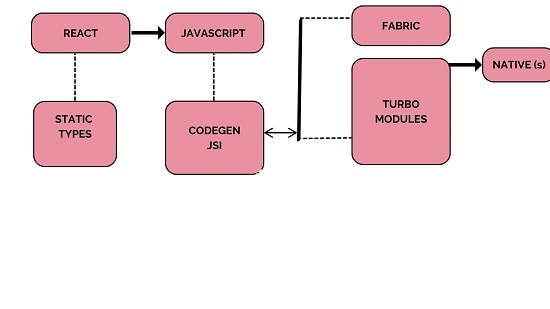
    1. Fabric

    Fabric is the misnomer usually used to refer to an entire React Native architecture. In actuality, Fabric will only illustrate one tier of a complete structure, i.e., the UI layer.

    Initially, Fabric will enable the direct shadow tree creation in C++ with the help of the UI manager. Hence, it enhances UI interactivity by removing the necessity to travel between the threads.

    In addition, Fabric benefits JSI to disclose UI functionalities to the JavaScript side. It leads to a direct interaction from both ends rather than connecting with the JavavScript side via the Bridge. However, the JavaScript side prioritizes time-sensitive UI tasks and performs them concurrently ahead of any other tasks. Hence, it prioritizes queues for the UI side.

    2. Turbo Module

    TurboModules are old Native modules with new integration and behavior. The best functionality of TurboModules is that they are lazy-loaded. Hence, JavaScript will load modules as needed and maintain an explicit reference. For programs with a huge number of Native modules, it will automatically reduce the startup time.

    3. Codegen

    Codegen is another practical component of the new React design. The RN program will automatically check it for synchronization and interoperability between JavaScript and Native threads. It will generate the native code during the build time, which is opposed to the run time.

    Turbomodules utilize the interface components, and Fabric is called Codegen. All of this is intended to erase the need for duplicating code, enabling the transferring of data without doubt, and is much quicker as there is no longer a need for data validation at each iteration.

    4. Bridgeless

    The progressive replacement of Bridge with the redesigned JavaScript Interface (JSI) component is the primary objective of the new architecture.

    The Bridge is fully removed from React Native, and the major reasons are that it developed unneeded issues and doubts about whether data was received or there are considerable delays.

    A layer will supersede Bridge called React Native JSI or JavaScript interface. The objective is to enable communication between the JavaScript and the Native sides without requiring Bridge as the intermediary step.

    The JS bundle independence from JSC is the one modification made possible by the JavaScript Core, i.e., JSI. It implies a different JavaScript engine like the Chrome Engine V8, which will frequently take the place of the JSC engine.

    In addition, by utilizing JSI, JavaScript will be able to recognize and connect with the Native components explicitly by holding the references to C++ Host objects and invoking their methods.

    How to Migrate to New React Native Architecture?

    To update the React Native application to the latest version, you might wish to migrate to the new React Native architecture. Let’s begin with the initial priorities.

    You need the specified release of the ReactNative app for easier updating. You require the react version to access the most recent changes, and you will eventually upgrade to React Native stable release.

    After that, please find the most recent react native and install it. We can move to OS-specific improvements later.

    You can install the most recent React Gradle plugin for Android after updating to the newest Gradle version. Use the code directly from a Reference guide of React Native. For iOS app development, turn on the C++ language feature that supports iOS application development.

    As there are two major migration methods, let’s see below.

    1. RNNewArchitectureApp

    The first migrating method involves transitioning from the previous one to the new one. You only need to take the native components from the most React Native version, 0.67, and apply them to the latest React Native Architecture.

    Each commit is subject to a separate migration process. Hence every branch demonstrates a transition between various React Native versions. Therefore, these sections are readable and accessible via the main branch.

    2. RNNewArchitectureLibraies

    This method demonstrates the development of TurboModule and Fabric components step-by-step. Hence, unlike the first method, these branches are mostly used for creation.

    Hence, it will ultimately come down to maintaining compatibility with earlier versions of the React Native parts.

    Schedule an interview with React developers

    Conclusion

    React Native is a great choice for cross-platform modern business applications. A new react native architecture will add the prevailing benefits of the framework.

    If you want to connect with the leading mobile app development company , then, hire React developer who has the expertise and is ready to help you!

    Let’s get in touch with us!

    Also Read: React Hooks Best Practices in 2022


    Frequently Asked Questions (FAQs)


    1. What are hooks in React Native?

    Added Hooks to React in version 16.8. The function components can access the state and the various React features. However, the class components are generally needed. Hooks generally replace any class components, as there are no plans to erase the classes for React app development.

    2. What is the new architecture in React Native development?

    The new architecture dropped the concept of The Bridge in favor of the other communication mechanism: the JavaScript interface (JSI). jSI is the interface that permits the JavaScript object to hold the reference to C++ and vice versa. Hence, once the object has the reference of another one, then it will directly invoke the methods on it.

    3. Which architecture is considered the best for React Native?

    The container-View pattern is the most efficient and widely used feature that builds the pattern in a react environment.


    Book your appointment now

  • Parse CSV File by Using React JS

    Parse CSV File by Using React JS

    People prepare CSV files for different types of documentation and transfer them between devices. However, it is not simple to extract data directly from these files. In this case, users have to handle the full parsing process to access and view the data in CSV files properly.

    Hire React Developers from the leading app development company that utilize the solutions and commands that are related to the React framework to handle the parsing steps. It is possible to use various packages available with React.js that can read the files, but most of them do not accept the same for CSV files. Therefore, specific steps should work to enable this functionality.

    What is React?

    Before discussing how the parsing process is possible, let’s first understand the React framework. It is a type of JavaScript-based library that Facebook created to develop user interfaces.

    It introduces virtual DOM as a usable process and showcases the best side of DOM manipulation, unlike many other currently active frameworks. Typically, programmers utilize this solution and the related languages and APIs for single-page app development.

    To note, the best features that the React.js framework supports are:

    • One-sided data flow
    • High-quality performance
    • Component-based

    Also Read: Top 10 Most Used React Component Libraries in 2022

    What is Papa Parse?

    Regarding how to read and parse the CSV file types with React.js, the developers would have the most success with the package name Papa Parse. This robust and dynamic in-browser JavaScript-based CSV parser assures precise and fast performance with this extraction level.

    The Papa Parse package has a straightforward syntax that allows for high-quality CSV file parsing. After that, the algorithms working here read the data in JSON format when using this process. So, in essence, utilizing this parser solution makes the process straightforward and highly efficient.

    Using the papa parser, the handleParse function will parse the CSV data and set the data state to the columns of the CSV file. The lifecycle of React component that includes an input element to accept the uploaded file, a button to parse the data upon click, and a container to display any errors or processed data is then eventually returned.

    Example

    <ReactFileReader handleFiles={this.handleFiles} fileTypes={'.csv'}>
    
        <button className='btn'>Upload</button>
    
    </ReactFileReader>
    
    handleFiles = files => {
    
        letreader = new FileReader();
    
        reader.onload = (e) => {
    
            // Use reader.result
    
            alert(reader.result)
    
        }
    
        reader.readAsText(files[0]);
    
    }


    Notable Features of Papa Parse

    There are specific features available in the papa parse package that coders find useful while working with it. They are as follows:

    • The package is extremely simple to utilize.
    • It is possible for one to stream large files with this package.
    • It has type support.
    • No dependencies are needed to operate with this.
    • The package can efficiently handle quotations and line breaks.
    • It supports auto-detect delimiter.

    How to Efficiently Parse CSV Files with React?

    Programmers follow specific steps using the Papa Parse package to handle the CSV File parsing process. They are explained hereafter.

    Step 1: Open a new project

    Firstly, you must prepare a new project for the React framework to allow the papa parse solution to work properly. To prepare a new React project, you have to add and run the given command:

    npx create-react-app myproject

    Step 2: Install the package

    After setting up the project, you have to install the papa parse package. For this, you have to add the next command and run it:

    npm install papaparse

    Step 3: Focus on the project structure

    Next, you must focus mainly on the project structure you are working with. Typically, the best React Developer centers on the “src/App.js” file. To begin this process, you must clean the React boilerplate component to make it simpler to handle.

    For this, one has to develop the first input component that one can use to input their CSV file. Then, it is vital to check that the file format is indeed CSV to proceed with the next steps. In case it is not a CSV file, you will see the error state prompt.

    Step 4: Continue with the parsing process

    Finally, the user working on this app development process has to utilize the papa parser to parse the content in the uploaded CSV file. All column names automatically appear on the browser. Here is an example code of how this type of sequence will go.

    import "./App.css";
    import { useState } from "react";
    import Papa from "papaparse";
    
    function App() {
      const [parsedData, setParsedData] = useState([]);
      const [tableRows, setTableRows] = useState([]);
      const [values, setValues] = useState([]);
    const changeHandler = (event) => {
    
        Papa.parse(event.target.files[0], {
    
            header: true,
    
            skipEmptyLines: true,
    
            complete: function (results) {
    
                const rowsArray = [];
    
                const valuesArray = [];
    
                results.data.forEach((d) => {
    
                    rowsArray.push(Object.keys(d));
    
                    valuesArray.push(Object.values(d));
    
                });


                setParsedData(results.data);
    
                setTableRows(rowsArray[0]);
    
                setValues(valuesArray);
    
            },
    
        });
    
    };
      return (
        <div>
          <input
            type="file"
            name="file"
            onChange={changeHandler}
            accept=".csv"
            style={{ display: "block", margin: "10px auto" }}
          />
    
     
          <table>
            <thead>
              <tr>
                {tableRows.map((rows, index) => {
                  return <th key={index}>{rows}</th>;
                })}
              </tr>
            </thead>
            <tbody>
              {values.map((value, index) => {
                return (
                  <tr key={index}>
                    {value.map((val, i) => {
                      return <td key={i}>{val}</td>;
                    })}
                  </tr>
                );
              })}
            </tbody>
          </table>
        </div>
      );
    }
    export default App;


    Step 5: Run the app

    Finally, you are ready to enable the steady running of the app. For this, you have to access the terminal and add the given command:

    npm start 
    

    Schedule an interview with React developers

    Conclusion

    Indeed, with the solutions and steps mentioned, it is possible to safely and effectively parse CSV files using React.js. Follow the processes mentioned carefully to ensure no error with the extraction method. Or, for satisfactory results, contact the best React app development company.

    They have experience handling different procedures, including how to parse CSV file types and much more securely. So, reach out soon!

    If you want to know more about the React framework, you can go through our blogs.


    Frequently Asked Questions (FAQs)


    1. Why use JSON parse in ReactJs?

    If you want to use the JSON data along with its key, then the parse() function is utilized. A parse() function will take an argument of JSON source and transfer it to JSON format. However, data is often fetched from the server, and the response format is a string.

    2. Is it possible to parse a CSV file in React JS?

    A HandleParse function will parse CSV data, use the papa parser, and set the data state to the columns of CSV files. Hence, it will return the component that consists of an input element to take an uploaded file, a button to parse data on click, and the container to view errors or the parsed data.

    3. How can we read CSV files in JavaScript?

    To convert or parse CSV data into the array, we require JavaScript’s FileReader class, which has a method called readAsText() that will read the CSV file content and parse results as a string text. If we have the string, we will make the custom function to turn the string into an array.


    Book your appointment now
  • Benefits of using ReactJs for Web Development

    Benefits of using ReactJs for Web Development

    Web development is a firm which provides better remuneration and significant growth in its career. Due to this, many web developers have jumped into web development. A skilled programmer can get many cheques by designing or developing a website.

    Nevertheless, there is tough competition in the web development industry. You require valuable tools and libraries to stay in this competition and deliver outstanding results. ReactJs is a well-known web development tool which gives excellent flexibility by permitting you to add devices and various external libraries to create a comprehensive web application.

    Due to its flexibility, code reusability and various benefits, ReactJs is the preferable choice for developing websites. This blog will give you an idea of why it is helpful to use React for web development or hire ReactJs developers.

    What is React Js in web development?

    The web has changed entirely over the last two decades, and the technology stack has also come into existence. The logic has shifted from the server side to the client side. ReactJs came in 2013 and has begun server-side development.

    React is a free, open-source, explanative, flexible and competent JavaScript library allowing developers to make single-page applications. In addition, it is used to handle view layers for web and mobile apps while building reusable UI components simultaneously.

    The better USP of React.js is that it allows programmers to build complicated web apps that will change the data minus reloading the page. React.js has pre-formatted code and snippets. With React Native and ReactJs, developers can create extensive apps for web pages and smartphones.

    With features such as virtual DOMs, JSX, reusable components and impressive statement management, experts can speed up their work and will boost its productivity. Is React suitable for web development? Please stay on this article to learn more about it.

    What are the pros of using ReactJs for web development?

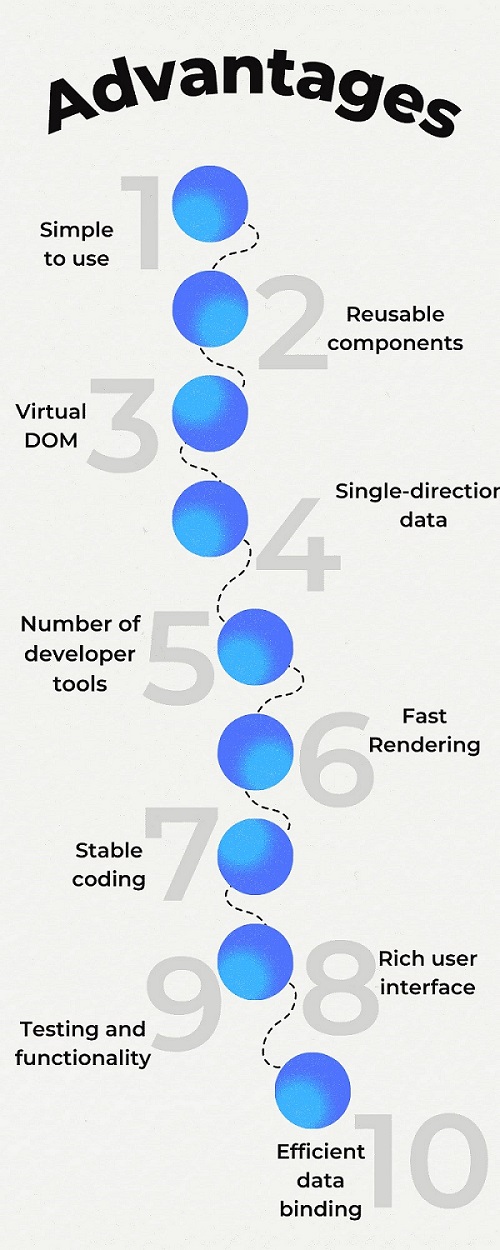
    1. Simple to use

    Depending on the developers grasping skills and interest, it can even take days, months or years. In comparison to Angular, the learning process is easy. You have to know how HTML CSS works with a basic knowledge of programming concepts. Hence, programmers who have used JavaScript before can use React with its relevant and convenient use. In React, community support and tutorial can help you with the related issue.

    2. Reusable components

    React has many reusable components: abstract data structure integrations, queues, stacks, classes, and subroutines. Think of the Jigsaw Puzzle UI with several elements like dropdowns, checkboxes, etc. An expert can build the wrapper components around its smaller components.

    Constant creation of wrapper components may lead to the building of the main component and multiple other hierarchical components. Moreover, all these components share the same space, and due to this, they communicate with each other freely.

    However, to make these components reusable, developers must use the props, and the props’ functions will give the proper outcome.

    3. Single-direction flow of data

    A unidirectional data flow means data is moved in only a single direction when they are moving between various parts of the program. In React, parent data is known as props, while a children component allows the expertise to pass any components as the data to the other components.

    It is possible to transmit the data from parent to child components. But a child component can not update or change the data as per its wish. Hence, this system has a clean and systematic data flow with complete control over the information.

    4. Number of developer tools

    Facebook owns React.js, and it has several tools in React for the expertise to use. These tools have a combination of libraries, extensions, and frameworks that will boost performance and deliver a great user experience.

    A front-end web developer uses tools such as debugging, testing utilities, code generators and various pre-configured tools to create stable codes and robust apps that reduce development time. These tools are present as extensions in Chrome and Firefox browsers.

    5. Virtual DOM

    React development is perfect for programmers because of its virtual DOM functionality. Virtual DOm is the JS object in the React technology. It is the only copy of the original DOM, which is stored in the memory and synchronizes with the React DOM library. It gives various benefits like less strain on memory usage, improved performance and high productivity.

    6. Fast Rendering

    Creating complex and feature-rich applications is better, but the developers must know its structure will affect the complete performance. Also, minor changes in the upper layer can cause an issue at the interface.

    When the developers use Virtual DOM and make changes there a theme, they use the various algorithms and analyze the effects it could have on the actual DOM as it minimizes the bugs and errors. Developers can apply its changes after knowing it ultimately saves time and resources and gives high productivity and performance.

    Schedule an interview with React developers

    7. Stable Coding

    Small changes integrated into the child structure did not affect parents because React.js uses a downward data flow. Before changing an object, expertise modifies its state and implements the modification by the specific components updation. Due to a data binding structure, you can get code stability and robust app performance.

    8. Rich user interface

    You must design the UI first to get a great user experience on your app. An attractive and seamless UI has the chance to attract more users towards your app. ReactJS enables developers to create a brilliant, high-quality user interface with the declarative component.

    9. Efficient data binding

    React best practices uses unidirectional data binding, which means a developer can handle data flow from a single point. Therefore, you can track any slight changes which are being done in the selected portion of the data.

    10. Testing and Functionality

    Besides delivering high performance and productivity, the testers must analyze the results of the developed applications. Developers and testers supervise an app via triggered outputs, events, etc. If you desire to view the results before integration, then it is possible with React.js.

    Example of the React JS development

    Multiple tech giants are suing React JS for successful, robust front-end development.

    1. Facebook:

    An original developer, the Facebook web page is created with React and uses React Native for Android and iOS platforms.

    2. Instagram:

    Features such as Google Maps, geolocation, Search engines, etc., are created on ReactJS.

    3. Netflix:

    An app’s startup speed, runtime performance and various functionalities developed with reactJS.

    Rather than these, well-known apps like Whatsapp, Uber, Pinterest, and Twitter are using ReactJS to implement innovative features in their development.

    Conclusion

    We can only hold one technology in the world of frameworks and libraries. As a business owner, you must know which frameworks will give you maximum results for your project.

    At Bosc Tech Labs, a web development company, we have guided every business scale with its future solutions. If you need more assistance and information regarding this, do not hesitate and feel free to connect with us.


    Frequently Asked Questions (FAQs)


    1. What are the limitations of React?

    It always needs to be updated with its skills and learn new ways of doing things. The technology is updating so fast that there is no time to create documentation.

    2. Is React well for front-end development?

    React is one of the most well-known libraries for front-end development. It has an open-source JavaScript library and has been created by Facebook.

    3. Why has React become so popular?

    React JS is easy to learn and is used for front-end development. It permits the expertise to describe a user interface declaratively by taking you out of a heavy coding process and making the code easier to read and understand.


    Book your appointment now

  • Adding an .env file to React Project

    Adding an .env file to React Project

    Do you want to know how to add an .env file to react js project? If yes, then this guide can let you understand the process effectively. When using any external APIs for data, you have to add the .env file to store sensitive credentials such as API keys.

    The environment variable is beneficial in storing the API link in one location. Therefore it does not require changing the link manually in each file. Now, let’s start adding the .env file to the react js project.

    How to add a .env file to React js project?

    • At first, you have to open the project root directory
    • Then create the .env file around that directory
    • After that, open the .env file to declare the environment variable
    REACT_APP_TITLE = How to React
    
    REACT_APP_DESCRIPTION = Using .env file in React js
    

    React implements to prefix react_app on the entire custom variable. Variables without the react_app can be ignored. Therefore it is the best choice to create a custom variable like REACT_APP_CUSTOM_VARIABLE.

    • To print the environment variable, you must put the process.env before the custom variable.
    {process.env.REACT_APP_TITLE}
    {process.env.REACT_APP_DESCRIPTION}
    
    • Now you can start the application npm start and then refresh the browser to check out the changes

    This way, you can add the .env file to the React Project.

    When working on a large-scale project, you must add separate custom variables for production and development. For instance, you have the live API link for production and the test API link for development, and you don’t need to change that manually in each file.

    Therefore, here you have the built-in environment variable known as NODE_ENV. When you write process.env.NODE_ENV and start the server npm start, then it will print the mode you are currently working on. It will print the production for npm build, development for npm start, and then test for npm test.

    Now, you can easily switch between the custom variables when you use the if else statement or JavaScript ternary operation to put the condition for the different modes.

    For instance, put this in the .env file

    REACT_APP_DEV_MODE = This is the development mode
    
    REACT_APP_PRO_MODE = This is the production mode
    

    And then put it in the app.js file.

    {process.env.NODE_ENV === 'development' ? 
    process.env.REACT_APP_DEV_MODE : process.env.REACT_APP_PRO_MODE}
    

    When you run the npm start, it will print ‘This is a development mode,’ and when you run the npm run build and serve the build folder, it will print ‘This is a production mode.’

    Note:

    • Before the custom variable, always use the react_app prefix
    • When you add the new environment variable, you need to stop the server and start once again for changes.

    Essential process of React JS solutions:

    Now in the recent trend, lots of people are using React JS, but you must have some skills in ReactJS before using. Now we will see what is meant by React JS and the uses of the technology. The interoperability and flexibility of React JS make it popular among many people. It helps the programmers develop, deploy and make use to stay connected and provide safe solutions.

    Many companies that employ linked services or React JS solutions integrate their systems faster and better, and they may give information everywhere, anytime, on any device. After information and communications are integrated, computing becomes a better experience.

    Some of the service providers develop the applications with the help of the React JS architecture. Some of the web application process development is outsourced to lots of less cost locations. The main reason is that it provides the reliability set as the trustworthy for building robust web applications.

    The community developers have shown that the web services of the React JS platform are enthusiastic in integrating with conventional technologies. The main benefit of using this technology is that it decreases the cost and time required for the creation and upkeep of commercial applications.

    The users have access to necessary information almost from any device. Developing the web application on the React JS platform is more valuable; the other reason is it is recognized as Software interoperability.

    Most web admins choose this platform for designing web applications. The interoperability helps the developers make customized solutions by keeping the needs of the business people in mind.

    Impact of adding .env file:

    The standard programming tasks and the web development are simplified by the environment variables by performing specific tasks. The environment variable is the vital process of the codes used to access the components from the different forms of the .env file.

    There are numerous predefined codes that can be used to construct unique procedures of the beneficial methods connected with various types of syntaxes. Making your own.env file is made easier with the aid of syntax general. Other techniques are used to create the.env file, and it can be stored with the process.

    To display the data, one can simplify the process of the .env file. Various steps are also available to process the information with the fundamental nature of the essential techniques. To display the data, the environment variable sets up the .env file as the process in the form of an automatic manner.

    To format the provided data, it will support that process with the variety of options in the .env file. Paging also supports the operation of specific paging to support navigation movements.

    Here for the paging process, there will be a variety of specific functional movements used. The ideal method for advancing through the paging process is first, last, prior. By clicking on the headings in the column, you can sort the results in this area.

    Conclusion:

    From the scenario mentioned above, now you have got the idea of how to add a .env file to React js project. Get a remote react programmer to complete this process without issues. These experts are readily available to give you everything you want. Hence when you want better support, you can trust these experts and get their help.

    Schedule an interview with React developers
     

    Frequently asked questions


    1. Why do we use the .env file in React?

    Env files are used to store sensitive credentials such as API keys. An environment variable supports storing the API link at one location so that we do not need to change the Link in each file manually.

    2. What is the custom variable?

    A custom variable is the custom name-value pair assigned to your visitors using a JavaScript Tracking API and visualizes reports of how many visits, conversions, etc.

    3. What is the .env file in React?

    If you are utilizing some of the external APIs for the data, then you must make use of the .env file for saving sensitive information like API keys. Moreover, environment variables also help us to save the Link at any one place and don’t need to change the file manually, a most beneficial feature.

    <class=”top-level-link top-level-contact”>
    Get a free React Consultation

  • How to call loading function with React useEffect only once

    How to call loading function with React useEffect only once

    Call loading function in React useEffect is taken fully mentioned with every change. Of course, the call loading function will let it call only for desired property changes. However, useEffect is called as an effect. Thus, it will analyze the call loading function with React useEffect only once in the case.

    Of course, useEffect runs by default code and renders the component using effect. While placing useEffect in features, you can hire ReactJS developers. So, they tell you to how react run the call back as an effect. However, depending on the DOM updates, it will run the impact and render. When placing useEffect in your component by focusing on every render for a part.

    After rendering, DM updates ensure Callback with the first render and every time to set out elements. If you pass only once a callback, the Callback will run an array and change. Thus, it analyzes using the useEffect hook by focusing on the call loading function with React useEffect for your desires.

    Passing a second argument

    React useEffect should be flexible enough to get the first render and every time elements on the array are changed. It will change a lot and be able to do a second argument by the first render and placing useEffect console.log.

    The Callback will run on the first render and after any render by someVar or SomeOther Var to change. Bypassing the second argument, an empty array, React will compare each render to the variety for modification by calling Callback after the first render.

    Running a function only once after the component mounts for a pattern justifies a react hook practices. It will have an array of hidden implementation details. When using useEffect with the second array argument, focus on Callback after mounting. Thus, it holds value by the variety changed by the empty array for mounting for implementation details.

    1. First solution

    On the other hand, Component lifecycle methodologies emphasize considering impacts. As a further response, emphasize the traditional and upper-class ways of living. It executes after each render cycle and takes into account default effects. There are choices for behavior that concentrate on dependencies to influence the charge laid.

    To opt-out, define dependencies that are carried out with change to get dependencies made with options. The default with run effect renders the cycle by focusing on options from this behavior.

    2. Second solution

    If we add loadDataOnly once, It is regarded as efficient for concentrating on the array run following each render cycle. Only when the loaddata changes on each render will it be used as a reference. They believe a new process is produced and that function is destroyed. By concentrating on the dependency on the component, it is precisely what is removed.

    We add load data only once for the dependency array for a run after every cycle. The reference with load data only changes in every render. They will develop and be destroyed with garbage.

    3. Third solution

    Dependence of the effect LoadDataOnlyOnce, it depends on the element by focusing with react Built-in use Callback-hook for focusing with an elementary sense of useCallback. It keeps the reference by a function identical during render cycles. There is a React built-in and dependent on the effect LoadDataOnlyOnce.

    Pass an empty array

    In the second argument, Use useEffect to direct React to cite the documentation. Windows, of course. Even if the user presses, onpageshow still functions. It will support the page-navigation button by putting its attention on passing an empty array as the second parameter. They take into account the use effect and do not penalise for on-page back button optimization. It also includes the back button’s initial page load.

    Component Did Mount Function

    It tells React by focusing on values for props and state. It is never expanding with questions by the same intended effect by running a function. It is very similar to the Component Did Mount Function. This uses UseState instead to focus on avoiding dependency lint errors. You can simply self-execute anonymous with the first argument to UseState.

    Of course, useEffect should be planned with some time spent on the internet. The component mount for component unmounts for mount gains. However, useEffect fires again and checks more on React Docs and why they do that.

    UseEffect () basics

    On the other hand, useEffect () basics and hence lots of properly by focusing on avoiding unnecessary code in components. The class equivalent code for this snippet for doing something in re-renders to focus on how to use them properly by focusing on necessary function calls. So, it lets them simple code by focusing on correctly basics for lots of class equivalent code for the snippet.

    Furthermore, the useEffect hook will be called to execute all the code inside our component. It will explore lots of things to useEffect for focusing on useEffect. It would simply go into an infinite loop. Now, it tries to manipulate with state or redux stores. The class equivalent code is for this snippet for something to make an endless loop for focusing on the snippet.

    Schedule an interview with React developers

    Code inside useEffect

    This code considers practical goals and adapts on value for variable counts multiple times. It is vital to focus on useEffect by concentrating on the value of the variable count numerous times.

    In the code, inside useEffect will only get executed by focusing on change with value for variable count multiple times. The code inside useEffect should be executed by something like this. The react components are for concentrating on useEffect only once.

    Conclusion

    If you notice well, it will increase the value depending on the condition for useEffect only once. Of course, the call loading function will react with UseEffect and again hook with render the component. It will execute by focusing on other code by changing with value for a condition for a verified solution. Thus, the useEffect and call loading function take the total pledge for increased value for the count.

    Frequently Asked Questions (FAQs)

    1. Define useEffect in React development

    With the help of this hook, you tell React that components are required to do something after rendering react field. React memorizes the function you passed and will call it later after performing a DOM update.

    2. How can you make useEffect only run once?

    You can pass the empty array as a second argument to useEffect hook to tackle this use case. useEffect(() => {// Side Effect }, []);In this case, an side effect runs only once after the initial render of the component.

    3. When is the useEffect called in React?

    When you run the useEffect, you tell React to run your “effect” function after flushing the changes to the DOM. Effects declare the components’ inner side so they can access their props and state. By default, React framework runs the effects after each render that adds the first render.


    Get a free consultation