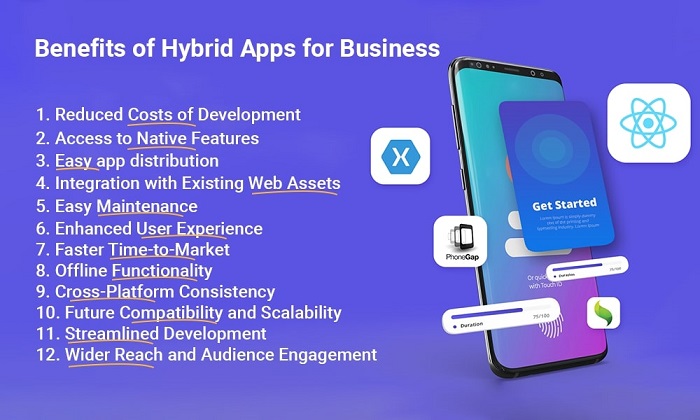
• Why Hybrid Mobile Apps Could Be a Good Idea for Your Business in 2026?

    Why Hybrid Mobile Apps Could Be a Good Idea for Your Business in 2026?

    Mobile applications development are becoming a vital tool for businesses to interact with their clients and improve the entire brand experience in the fast-paced digital world of today. There are several methods to take into account when it comes to app development, including hybrid, web, and native apps. This post will examine the benefits of hybrid mobile apps for your organization in 2023.

    Hybrid App: Introduction

    Let’s first examine what a hybrid app looks like.A mobile application created with web development software.

    An iOS or Android app that was created using the same technologies as a website is known as a hybrid app. Basically, native apps like iOS and Android cameras and GPS are developed using languages like Swift and Java.However, when creating hybrid apps, technologies like HTML5, CSS3, JavaScript, etc. are used.

    In addition, it depends on WebView, a feature of the OS that is standard, rather than a browser, as many web apps use. It is a “hybrid” since the content is read from the device’s mechanics web and it runs in the native environment.

    Compared to PWA, the display route is different.

    Both web applications that run online and native programs that run on the device are available for iOS and Android. PWAs, a subset of these web applications, have grown in popularity recently due to the rise in the number of applications that use them.

    The term “progressive web apps” (PWA) refers to a type of software that has both native and web applications. Although it functions similarly to a hybrid app, its appearance is different. The PWA will be seen in the browser because it functions like a native app on the desktop or laptop.

    A hybrid app has the attribute of being presented on the terminal by using the web’s mechanisms.

    How are hybrid apps working?

    If you want hybrid apps to function, WebView is essential. A feature of the OS for smartphones like iOS and Android is WebView. The main purpose of it is to integrate browser capabilities into native applications. As a result, you can include a function to display a web page in your program without developing or implementing it if you use WebView.

    Simply by adding code to use WebView during application development, it is possible to display a web page in an application. This WebView is used with the framework and in conjunction with it. The most common app development frameworks are Cordova-like ones.

    These frameworks include all of the components and functionalities required to create hybrid applications.

    Which Alternative Is Better: Native or Hybrid Apps?

    One of the most important factors to take into consideration while developing a mobile app is selecting the best technology. Native apps and hybrid apps are two often-used solutions. Don’t worry if you’re not familiar with these words; here is how the two categories of mobile applications differ from one another.

    Native Apps: Also referred to as official development apps, native apps are created exclusively for popular mobile operating systems like Android or iOS. These programs go through two different development procedures because they are developed separately for each operating system. Although the layout, features, and user interface may be the same, native apps need to be programmed differently for each technology.

    Kotlin or Java are the preferred programming languages for Android, while Swift or Objective-C are preferred for iOS.

    Hybrid applications: In contrast to native applications, hybrid apps (also known as multi-platform or cross-platform apps) are compatible with both Android and iOS and may be produced using the same source code and a single coder. There are numerous frameworks or tools available for creating hybrid apps, each with unique features and methods for developing an app that appears and functions like a native one.

    It’s crucial to remember that both native and hybrid apps have advantages and cater to various business requirements. Since they are tailored to various business settings, it is difficult to determine which is superior to the other. However, hybrid applications continue to be a popular option for businesses looking for quick and effective app solutions.

    Hybrid app development has additional benefits that are just waiting to be realized. What are you still holding out for? Let’s continue our investigation into the area of hybrid Android or iOS app development.

    Let’s now examine below why hybrid apps may be a wise decision for your business in 2023.

    Advantages of Hybrid Apps for Business

    1. Reduced Costs of Development:

    It frequently takes different development environments, knowledge, and resources to create native apps for both the iOS and Android platforms. Contrarily, hybrid apps can be created utilizing well-known web technologies, considerably lowering the education and personnel expenses involved in their development. Businesses simply need to create one app, lowering development costs in half because hybrid apps can function on both iOS and Android.

    2. Access to Native Features:

    In contrast to web apps, hybrid apps have access to native features, including the location sensor, camera, and GPS. This implies that businesses may make the most of mobile devices’ full potential and offer customers a better, more engaging user experience. Hybrid apps can provide capabilities that closely mimic those of native apps without sacrificing cross-platform compatibility by combining native functionality. As a result, there are countless opportunities for mobile app developers to make robust, feature-rich apps that work flawlessly across several platforms.

    3. Easy app distribution:

    Hybrid apps can be released through a variety of app stores, making it simple for companies to connect with their target market. To make their programs available to a variety of people, they can make use of platforms like the Google Play Store and the Apple App Store. Additionally, available through web channels, hybrid apps can expand their reach and awareness.

    4. Integration with Existing Web Assets:

    If your company currently has a website, hybrid apps can interface with those assets without any issues. By integrating these systems, businesses can take advantage of their current online infrastructure and data while providing a uniform user experience across all platforms.

    5. Easy Maintenance:

    Keeping native apps updated and compatible with different OS versions can be difficult and time-consuming. However, because hybrid programs rely on web-based methods, they are less impacted by OS upgrades. Changes can be made on the server side while updating a hybrid app, simplifying and streamlining maintenance.

    6. Enhanced User Experience:

    By utilizing the inherent functionality of the device, hybrid apps can offer a seamless and immersive user experience. To give users interactive and tailored experiences, they can use hardware features on the smartphone, including the camera, accelerometer, and geolocation. The improved user experience helps to increase client happiness and engagement.

    7. Faster Time-to-Market:

    When compared to creating separate native apps for several platforms, hybrid mobile app development enables organizations to speed up their time-to-market. Businesses may release their app faster, reach their target audience quickly, and obtain a competitive edge with a single codebase that can be utilized across platforms.

    8. Offline Functionality:

    Hybrid apps may have offline capability that enables users to access particular features and information even without an internet connection. Hybrid apps can offer uninterrupted user experiences by caching data and using local storage, which is especially useful when traveling or in locations with weak network connectivity.

    9. Cross-Platform Consistency:

    The ability of hybrid apps to retain consistency across various platforms is one of their fundamental advantages. Regardless of the device or operating system, businesses can make sure that their brand identification, design, and functionality remain consistent. Users benefit from a seamless experience and a strong brand presence because of this consistency.

    10. Future Compatibility and Scalability:

    Hybrid app development frameworks provide scalability, enabling organizations to scale their apps as their user bases and requirements grow. Hybrid apps also minimize the need for extensive rework or redevelopment by being built to adapt to future technological developments and operating system updates.

    11. Streamlined Development:

    For enterprises with previous web app development experience, hybrid apps are a great option. Hybrid apps eliminate the need to learn new technologies or programming languages. The HTML5, CSS3, and JavaScript expertise of the app developers can be utilized to build mobile applications. Utilizing a single codebase also enables businesses to reduce development time and costs, accelerating time-to-market.

    12. Wider Reach and Audience Engagement:

    By choosing hybrid app development, businesses may launch their apps across several platforms and engage a larger audience. Hybrid apps enable cross-platform compatibility, whether they are for iOS or Android, ensuring that users of various devices may access and use the app without any issues. This broader reach translates into higher audience engagement and possible business growth.

    Given these benefits, it is obvious that hybrid mobile apps may be a wise decision for companies in 2023. They provide access to native device functions and offer a cost-effective option by making use of already-existing web development expertise. Businesses may concentrate on providing a high-quality user experience and effectively engaging with their clients by using streamlined development and simple upkeep.

    Working with a reputable mobile app development company is essential if you want to take advantage of hybrid app development’s advantages. These organizations can assist enterprises across the whole development lifecycle and are experts in hybrid app development frameworks like Ionic, React Native, or Flutter. They also specialize in app development.

    Conclusion

    Mobile applications are now a crucial tool for businesses to interact with clients and improve the brand experience in the modern digital world. Hybrid mobile apps will be a great alternative for organizations in 2023 when evaluating app development possibilities. But working with a reputable app development company is essential if you want to take full advantage of hybrid app development. These businesses concentrate on creating apps and are skilled in working with hybrid app development frameworks like Ionic, React Native, or Flutter. Businesses may benefit from hybrid apps, provide top-notch user experiences, and effectively interact with their customers in 2023 and beyond by working with a dependable partner.

    Get in touch with BOSC Tech Labs, a top app development company that specializes in producing cutting-edge and effective mobile applications, to learn more about the advantages of hybrid app development for your organization. Connect with the professionals in mobile application development right now to take the first step toward maximizing the potential of hybrid apps for your company’s growth.

    Frequently Asked Questions (FAQs)

    1. What makes hybrid apps the future?

    The testing load is lessened by hybrid apps, which enable code reuse. Since hybrid apps are developed from a single codebase, there is a reduction in the QA (quality assurance) process due to the minimal infrastructure required to test the mobile app. Hybrid apps can significantly enhance UX and UI.

    2. Are hybrid apps quicker than web apps?

    Speed. Sometimes mobile web apps are slower and less responsive than native apps. Although the functionality of the app mostly depends on the user’s internet connectivity, hybrid apps may provide faster performance.

    3. Describe the hybrid mobile app.

    Hybrid apps, which function on iOS and Android, combine features of native apps as well as web apps. They have cross-platform features because they were created using front-end developer languages like HTML5, CSS, and JavaScript. Given that they only need a single codebase, hybrid apps are both cost-effective and easy to maintain.

    4. What distinguishes a hybrid app from a web app?

    Any device, regardless of operating system, can use hybrid ones. App stores allow for the distribution and installation of both native and hybrid software on devices. Contrarily, web apps are browser-based and cannot be downloaded or installed on devices.

    Book your appointment now

  • The Ultimate Guide to IoT Testing in 2026

    The Ultimate Guide to IoT Testing in 2026

    In the Worldwide today, there are more than 14 billion IoT devices[1] that are on the internet. And this is only the beginning, as business-wide digital transformation has recently grown increasingly important.

    Things like delivery robots, self-driving cars, smart home appliances, surgical robots, and more have become a reality through the Internet of Things (IoT).

    A poor user experience could result from not thoroughly testing the IoT app you intend to release. The reputation of your company may suffer if your product has serious imperfections. IoT solutions must undergo rigorous testing and extensive validation like other applications.

    Let us bring you through a detailed approach to testing IoT applications while also discussing the advantages and challenges of IoT testing. So let’s get started!

    IoT testing – what is it?

    Internet of Things testing is a fluid process that includes a range of tests, approaches, and tools to ensure that your IoT framework is ready to launch. Identifying and addressing any current or possible vulnerabilities before deployment comprises testing the app’s functionality, performance, user experience, security, and network connectivity.

    IoT software testing adds a range of expertise to traditional software testing since IoT is a heterogeneous network of underlying communication technologies and connected devices. Evaluating the dependability, effectiveness, and ability to transfer sensitive data across numerous devices and platforms involves everything from testing scenarios and tailored techniques to virtualization and automation. IoT application testing is crucial since the IoT market is still in its early stages and faces obstacles from the cutting edge of technical advancement. In conclusion, Internet of Things testing helps you reduce the time to market and lower the price and the effort of project updates.

    Types of IoT Testing

    Devices, security, analytics, networks, processors, platforms, and operating systems are all key components of many IoT application types. Different kinds of testing are carried out on IoT devices to ensure the reliability and functionality of IoT systems. Let’s examine the typical IoT software testing types:

    1. Functional Testing

    It is done to verify how each component behaves and generates results compared to the specifications, individually and across the end-to-end workflows of the entire application.

    2. Compatibility Testing

    It focuses on ensuring that devices function correctly on various operating systems, browsers, and device configurations. For a consistent user experience, this testing verifies that gadgets may interface and function flawlessly across various platforms.

    3. Performance Testing

    The second stage of testing IoT applications involves monitoring metrics for latency, throughput, response time, and CPU utilization while subjected to stress loads and shifting network circumstances. It also considers the impacts of thousands of devices delivering and receiving data continually.

    4. Integrity Testing

    It has been performed to ensure your IoT application integrates seamlessly with enterprise software like asset tracking, field service applications, ERP, CRM, and data warehousing. In addition to establishing the compatibility of several crucial components with the underlying tech stack, integration testing concentrates on the seamless data transfer between your IoT app and third-party integrations.

    5. Connectivity Testing

    The third phase, connectivity testing, comes after the compatibility and performance testing certification. It is done to ensure that data is transmitted between connected devices and the IoT network without interruptions. It aids in validating the connection’s dependability and stability, as well as the capacity of the devices to establish and maintain uninterrupted connections. The device’s capacity to cope with various network situations, from low bandwidth to intermittent connectivity, is also confirmed by this IoT testing method.

    6. Usability Testing

    The main goal of the testing is to determine how simple it is for end customers to use linked devices. It evaluates a gadget’s user experience, navigation, and interface design. The general usability of the gadget can be improved by identifying possible problems early on and making necessary adjustments.

    7. Security Testing

    To protect your Internet of Things (IoT) solution from unwanted access, data breaches, and unlawful activities, it focuses on the security of IoT field gateways and system design. However, it strengthens the security robustness of IoT apps; vulnerability assessment is equally important for finding potential vulnerabilities in the software, firmware, or network framework.

    IoT Testing Framework

    Having a clear framework is of the utmost importance while testing IoT applications. Four important stages make up an efficient IoT testing framework, ensuring thorough testing coverage.

    1. Physical Layer
    Any IoT ecosystem’s physical building blocks, including sensors, controllers, and other connected devices, are its core. This layer’s testing primarily focuses on validating these devices’ best reliability and functionality. Testing must be conducted to ensure reliable data collection, device connectivity, and strict adherence to set standards.

    2. Network Layer
    The network layer fills the gap between connected devices and gateways. The IoT ecosystem guarantees seamless connectivity and quick data transfer through testing.

    3. Data Management Layer
    The data produced by IoT-enabled devices must be stored, consolidated, and analyzed by this layer. This layer’s testing contributes to validating secure data aggregation, storage, processing, and retrieval.

    4. Application Layer
    The front-end components responsible for reporting, control, and data visualization are included in this layer. This layer of testing focuses on validating the user interface’s performance, functionality, and responsiveness, which ultimately impacts how data is presented for efficient decision-making.

    Advantages of IoT Testing

    IoT applications should be rigorously tested to help your organization improve app reliability and accelerate its time in the market. The following are the main benefits of IoT app testing:

    1. Enhanced Reliability:

    Testing IoT applications lowers the chance of system failures while ensuring that they perform perfectly and provide a seamless user experience.

    2. Seamless Integration:

    Integrating various linked devices and systems seamlessly is essential for IoT initiatives. IoT testing, on its whole, provides compatibility and smooth interoperability between various IoT platforms. It works similarly to a smartwatch that connects to your phone, car, and home gadgets to make life easier.

    3. Scalability:

    Successful IoT systems are built to accommodate ever-growing information demands and emerging technologies. Your IoT app’s scalability may be tested under stress to make sure it can cope with sudden fluctuations in data volume, device connectivity, and user interactions.

    4. Improved Security:

    By testing IoT applications, you can improve linked systems’ defenses against threat detection. It keeps data secure and prevents devices from unauthorized access.

    5. Optimal Performance:

    IoT applications frequently work in remote settings and deal with enormous amounts of data. For optimum app performance, testing them identifies bottlenecks, ensures effective data transmission, and maximizes the utilization of resources. For example, a smart city initiative using a tried-and-true IoT-powered app can modify traffic lights in real-time, alleviate congestion, and speed up travel times for its residents.

    6. Cost savings:

    By identifying and fixing problems early in the development cycle, IoT application testing helps you avoid expensive failures. Additionally, thorough testing methods speed up the development process and decrease the time to market.

    Leading IoT Testing Tools

    Your initiatives for testing IoT apps can be considerably improved by having the appropriate testing tools available. Our QA specialists at BOSC Tech Labs use the best IoT testing technologies to provide robust and dependable IoT apps.

    API testing: To test the functionality and performance of APIs in your IoT apps, we use tools like Postman, Swagger, and SOAP. We can validate responses and monitor the functionality of your API endpoints with the help of these API testing tools, ensuring that communication between your IoT devices and the API infrastructure runs smoothly.

    Performance Testing: We utilize JMeter to ensure your IoT app can handle high usage and varying demands. We simulate heavy loads, evaluate reaction times, and examine the scalability and dependability of an IoT solution with this tool.

    Network Protocol: WireShark is the network protocol analyzer we use to track and troubleshoot network-related problems. It allows us to identify network issues and optimize setups to provide seamless communication between connected devices and the IoT network architecture.

    IoT Testing Process in 7 Steps

    Our app development services ensure your IoT apps’ quality and reliability. The essential procedures we adhere to provide top-notch IoT solutions are listed below.

    Step 1: Clarifying Configure Devices and Business Needs

    It is easier to match the configured devices with the needs of the business if you are aware of their intended functions. This clarity determines our testing strategy’s future steps.

    Step 2: Plan the best-fit IoT test strategy

    The QA manager creates an IoT test strategy and plan covering every testing aspect and addressing potential risks. It outlines the testing goals, appropriate techniques, and the range and timetable for carrying out testing tasks.

    Step 3: Risk Identification and Mitigation Plan for IoT Testing

    Next, we pinpoint any potential dangers unique to IoT applications in your industry. Then, we evaluate the security gaps, potential connectivity problems, compatibility worries, and performance limitations. Our team creates a comprehensive mitigation plan based on the risk assessment to deal with these risks proactively.

    Step 4: Creating Test Scenarios Based on Requirements

    Our professional team then verifies your IoT applications’ functionality, performance, and dependability through scenario designs and testing. These scenarios are customized to meet certain application and industrial use case needs. The team makes an effort to test a variety of use cases and scenarios.

    Step 5: Creating the Ideal Environment and IoT Hub

    After that, we put up an IoT hub that mimics actual connectivity settings so that we could build accurate IoT simulations and perform tests in a safe environment. This enables us to evaluate the IoT application’s stability and functionality.

    Step 6: Technical and design teams are combined in the collaborative process

    Our collaborative techniques ensure a cross-functional team of IoT testers, developers, and designers. We give you access to our team’s technical expertise and experience so you can spot possible problems and produce high-caliber software.

    Step 7: Utilizing test technique categories to plan each test phase

    We carefully design each test phase based on the categories defined in our test approach to create a systematic and well-organized testing process. These include, among others, connectivity testing, compatibility testing, performance testing, security testing, and regression testing.

    Our skilled team of IoT app developers offers complete software testing and quality assurance services to guarantee the faultless functioning and functionality of your IoT goods and solutions. Contact our IoT testing experts to speed up your business’ IoT initiatives.

    Conclusion

    We provide thorough IoT testing services to accommodate a variety of devices, protocols, and technological platforms as your one-stop IoT app testing partner. We concentrate on your company’s unique IoT testing requirements to ensure seamless performance and operation.

    We have practical expertise working with cutting-edge testing tools and network protocols to help you get your IoT solutions to market more quickly.

    With a qualified staff of IoT-savvy testers and a strong IoT testing infrastructure, BOSC Tech Labs offers end-to-end IoT testing services. Utilize our IoT testing experience immediately to create scalable, intelligent IoT products and solutions.

    Frequently Asked Questions (FAQs)

    1. How does IoT test automation work?

    A common business framework for agile software development is what IoT automation testing is primarily used for. Using the dynamic system development approach and automation testing makes planning, managing, executing, and balancing agile approaches and continuous software development projects simpler.

    2. What are some of the best techniques to follow for IoT application testing?

    Comprehensive Device Compatibility: Ensure thorough testing across IoT devices to guarantee seamless functionality.

    Data Security and Privacy: Prioritize security testing to safeguard sensitive data and privacy in IoT applications.

    Scalability Assessment: Test for scalability to ensure the IoT application can handle increasing device and data loads effectively.

    3. How are IoT tests conducted?

    Since IoT systems are made using a variety of hardware and software combinations, compatibility checks should be carried out initially. This is because this is the most significant phase in IoT testing. This approach frequently involves testing various devices, browsers, operating systems, and communication protocols to guarantee optimal compatibility.

    Book your appointment now

  • A Complete Development Guide: Hotel Management System (HMS)

    A Complete Development Guide: Hotel Management System (HMS)

    There are so many projects waiting to be finished in hotels! Some employ traditional hotel management procedures, while others use distinct software development methods to perform particular responsibilities.

    Imagine if your hotel’s reception area is overrun with guests arriving with questions, staff members requesting to make entries, and so on. Given that they have to deal with numerous registers or spreadsheets, your reception team members must have difficulty deciding which question to respond to first. Or it’s challenging even if they need more hotel management software.

    What if you could seamlessly streamline all of your hotel management tasks? A centralized hotel management system with modules for each hotel task and team to complete their part would be fantastic, wouldn’t it?

    If so, it’s time to design hotel management software specifically to match the needs of your business. However, you must be knowledgeable about designing an end-to-end hotel management system.

    Good heart! As we created this in-depth guidance for hotel management software development. Everything you need to know is covered in this blog, including types, features, development procedures, cost analyses, and more.

    So let’s build a path to pass through and collect all the information regarding developing hotel management software.

    Introduction of Hotel Management System

    Hotel management systems (HMS) are software used in the hospitality sector. It aids in managing hotel business operations and providing seamless hotel experiences to guests. But how can this hotel management software provide such ease of use?

    You can manage staff, bookings, inventory, and billing in one place with the support of end-to-end hotel management software.

    Even third-party apps like payment gateways and websites for booking hotels can be integrated with it. Therefore, you receive reservation notifications directly into your integrated hotel management system, regardless of the booking platform.

    Is there any other hotel-related software you can develop besides this one? There are, and we’ll look at them in the part after that.

    Which Types of Hotel Management Software Are Available?

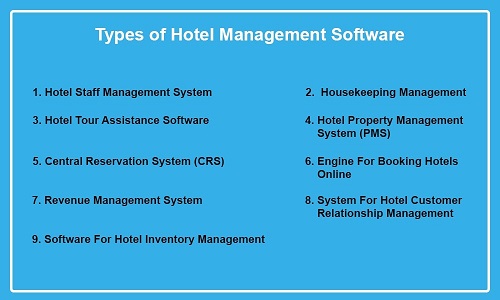
    Of course, you need a comprehensive system with various components to simplify your hotel management process. And those you can even build independently before integrating them at your leisure. Putting that aside, here is a list of several different types of hotel management software you can create:
    Types of Hotel Management Software

    1. Hotel Staff Management System

    The hospitality industry has personnel separated into teams of experts for various jobs, much like any other industry. Also, the kitchen, room service, and reception teams are part of the hotel management system. Consequently, managing your hotel’s large team members can be challenging if your business is large.

    Your hotel staff management software will save you in this situation. You can create a hotel-specific HRMS with HRA, daily reporting, and other features to manage employees and efficiently allocate tasks.

    2. Housekeeping Management

    If you wish to do it this way, housekeeping management software can be a separate app. You can also create housekeeping management software as a module to interface with your HMS.

    The housekeeping/room service staff may find housekeeping management software to be a useful tool. It makes it simple to allocate and schedule cleaning jobs, preserving your hotel’s high standards of hygienic practices and cleanliness.

    3. Hotel Tour Assistance Software

    You require a hotel tour assistance/guiding feature in a hotel-specific experience app when your hotel spreads out across a vast region and offers a variety of interesting but somewhat complicated things to discover inside.

    You can use AR/VR or metaverse technology to develop a hotel tour experience app that allows visitors to explore your hotel physically and virtually.

    It makes it easier for clients to locate their rooms independently without staff support and even conveniently explore other hotel attractions.

    It is overdue for the hotel industry to use AR/VR-like web3 technical solutions since many hotels have already implemented or will implement VR technology to enhance the visitor experience.

    4. Hotel Property Management System (PMS)

    A vital component of hotel management software that every hotel business needs. Using a hotel property management system, you may manage front desk operations, housekeeping, accounting, reporting, and more.

    5. Central Reservation System (CRS)

    It is an integrated system that can assist you in managing hotel activities in real time, including the distribution of inventory, prices, reservations, and more.

    A central reservation system gathers your information from systems like PMS, GDS, internet booking registries, etc. Consequently, a single glass pane lets you view the hotel’s data.

    You might even refer to this CRS solution as the core of every hotel management system you deploy. It transfers data from one software to distribution channels, the root cause.

    6. Engine For Booking Hotels Online

    You might choose the development of an online hotel booking app if you want to start a business based on a hotel-related product. What is that, though? Hotel owners can put their properties on an online booking engine to receive reservations.

    One study reveals that 38 websites, most of which are online hotel booking engines, are frequently encountered by travelers wanting to make hotel reservations. Additionally, they receive commissions for the success of each deal and charge hotels and visitors for the platform service costs.

    7. Revenue Management System

    Many parts of the world have different travel seasons based on their climate. Additionally, the peak travel season is when hotels may generate more business and make significant profits.

    A hotel revenue management system can be beneficial in such circumstances. In simple terms, RMS aids hotels in optimizing their pricing and other sources of income to correspond with market demand.

    In addition, RMS has a data analysis application that enables you to examine many criteria, including the behavior of web visitors and booking scenarios. You can create hotel business plans using the results of this study to provide the greatest deals for potential guests.

    8. System For Hotel Customer Relationship Management

    When it comes to generating revenue and preserving client relationships, CRM software is a fundamental requirement. You need this custom software development to communicate with guests and convince them to book your hotel for their next travels if your hotel business is a major hotel chain like Marriott or Hyatt.

    What makes CRM unique for hotels, then? What function does CRM serve in the hotel and hospitality sector?

    A cloud-based CRM platform for hotel management keeps track of visitor information, including reservation history, travel preferences, and more. These data can be used for marketing initiatives, and you can give app users individualized hotel-specific app experiences.

    You can utilize a CRM system for guest profiling, segmentation, personalization, feedback management, loyalty programs, upselling, cross-selling, and other purposes.

    9. Software For Hotel Inventory Management

    In the hotel industry, sustaining a nice customer stay experience depends on the supply. The hotel inventory management system might be of considerable assistance in this situation. It enables you to manage your hotel’s inventory, which includes everything from kitchenware to guestroom furnishings and cleaning supplies. Furthermore, you may maintain control over your hotel inventory by doing this.

    Hotel Management Statistics

    • In the next five years, technology will likely play a bigger role in determining a hotel’s success, according to a HotelTechReport survey of 81% of hoteliers.
    • In five years, 99% of hotels predict that their peers will utilize more technology to manage their operations.
    • According to 39% of hotels, technology’s most significant value proposition is “improving operational efficiency”. The majority of hoteliers feel technology can significantly alter front- and back-of-house processes, as evidenced by the responses “transforming guest journeys,” “improving business agility,” and “innovating for the future,” which were each given 31%, 15%, and 13%, respectively.
    • The most significant short-term objective of technology, according to 21% of hotels, is to change operating procedures and business processes. Following that, 19% mentioned “driving revenue,” 18% mentioned “better customer experiences,” 18% mentioned “improving efficiency,” and 11% mentioned “reducing operational costs.”
    • In the last five years, according to 31% of hoteliers, revenue management technology has advanced more than guest experience technology, which has advanced 28%.
    • In contrast, only 14% of hoteliers believe that revenue management technology will experience the greatest transformation over the next five years, according to a survey of 46% of the industry.
    • According to 86% of hotels, their property management system is the most vital part of daily operations, followed by their revenue management system and channel manager.
    • 39% of hoteliers use integrated payment processing capabilities in their property management system, while 56% use a third-party payment gateway.
    • By 2025, 54% of hoteliers reportedly use technology to enhance or entirely replace the front desk experience.
    • By keeping these figures in mind, you may make better technological decisions that will keep your hotel relevant and future-proof.

    Advantages Of Hotel Management System

    You can learn about the following advantages through hotel management systems:
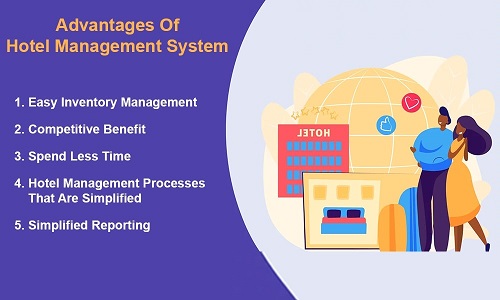
    Advantages of Hotel Management System

    1. Easy Inventory Management

    For various purposes, hotels frequently use various inventory distribution systems. You can quickly access and manage your hotel inventory with a hotel system. But how? Through consolidating inventory control.

    So, I wish goodbye to the challenges of completing many paperwork and checking processes. And thank you for having access at your fingertips to real-time inventory management.

    2. Competitive Benefit

    Your hotel management system can open up opportunities for you in the hospitality sector. It comprises seamless hotel management, providing visitors with a top-notch hospitality experience, an ideal working environment for staff, and more.

    So you can operate your hotel business on a service like a tech-savvy company. It distinguishes you from your rivals. Additionally, happy visitors will be loyal to your business and recommend it to their peers.

    Employees typically stay with your company longer if you give them a better working environment. Their happiness will affect how well they serve your guests, improving the company and brand reputation.

    3. Spend Less Time

    Hotel management software saves you time and effort on several monotonous tasks with its simple task assignment, team management, visibility over the hotel staff, and many other features.

    In addition, you can use this to automate various hotel administration functions, including tracking room availability, collecting reservations, handling payments, producing reports, delegating work, and much more.

    Therefore, the hotel application’s automation, visibility, accessibility, and centralized control simplify your job and enable you to spend less time on administrative tasks.

    4. Hotel Management Processes That Are Simplified

    A hotel management system gives you visibility into the projects that your staff are working on. Additionally, you can learn about free resources available to prepare for upcoming tasks or circumstances.

    Obtain daily reporting from your team, and make it visible to some employees with higher positions so they can carry out their management work. In addition to acquiring staff reporting, you can give any employee a task without having to go into the field and look them up before telling them what to accomplish.

    Even if hotel management tasks are frequently simplified, centralized hotel management software has some advantages.

    5. Simplified Reporting

    With only a few mouse clicks, a hotel management system makes it possible to get comprehensive, filtered, and real-time statistics on income, occupancy rate, average daily rate, housekeeping, forecasting, marketing, sales, kitchen supplies, and more.

    As a result, you may prepare everything using your tech-driven hotel management system without going through the complicated hotel analysis phase.

    Which Features Should Be Incorporated Into a Hotel Management System?

    Your hotel management software will only become rich with additional features. Your hotel system can be used to enhance your hotel management processes by adding the proper functionality. So let’s look at some aspects that your hotel management software must have:
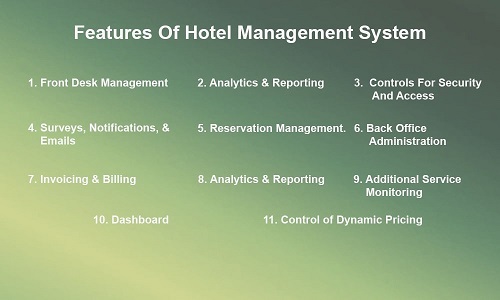
    Features of Hotel Management System

    1. Front Desk Management

    Following the confirmation of the reservation and the activity of the reception employees, the hotel’s appearance is next. They interact with visitors, assign rooms while overseeing room cleanliness, and even handle a variety of hotel distributions and topics.

    Including this function in your respectable hotel software system might be advantageous. With this feature, They can streamline check-ins and check-outs, guest profiling, room key management, and room assignment.

    2. Analytics & Reporting

    Of course, you can also collect a lot of data using conventional hotel management techniques, but doing so requires much work. The advent of AI/ML capabilities in hotel management software has allowed you to leverage the power of data through tools for sophisticated analytics and reporting.

    And to obtain rapid and real-time data on revenue and other hotel departments, this function needs to be added to hotel management software. Such information can be used to develop effective marketing and management plans for your hotel.

    3. Controls For Security And Access

    You want to avoid losing your data or visitors’ data to hackers because they are both valuable. Therefore, you should give strong security measures and access controls (such as multi-factor authentication, hierarchy-based accessibility, etc.) top priority while creating software for your hotel.

    Ensuring that your system complies with the regulations that apply to the hotel business is also crucial. Cyber threats can be reduced by keeping your software up to date using security best practices.

    4. Surveys, Notifications, & Emails

    Utilizing technology is essential for staying ahead in the fast-paced world of hotel management. The guest experience can be revolutionized by implementing a strong hotel management system with seamless email notifications and survey integration. Automated email notifications can update customers about their reservations, check-in reminders, and customized offers in real-time. Additionally, carefully crafted surveys provide insightful input for ongoing improvement, increasing customer happiness and loyalty. Improve performance at your hotel with these crucial tools.

    5. Reservation Management

    Hoteliers strongly like to centralize their reservation system regarding hotel reservation/booking administration. They can keep track of reservations made through various platforms, including bookings, changes, cancellations, and room allocations.

    6. Back Office Administration

    In hotel management, managing the personnel is crucial because back office management is responsible for ensuring staff productivity. You may monitor your staff’s given duties, break times, absences, and other factors with the help of this feature.

    7. Invoicing & Billing

    You want to rely on something other than conventional register techniques as a hotel organization dealing with numerous guests to record additional services clients utilize. Your process for creating invoices and billing will become more difficult as a result.

    A feature of your hotel management software should be automatically creating bills and invoices. It makes it easier to keep track of entries with predetermined rates. As a result, you can quickly generate their bills during check-out.

    The feature of your invoicing and bills function that accepts online payments is also possible.

    8. Analytics & Reporting

    Of course, you can also collect much data using traditional hotel management techniques, but doing so requires much work. The advent of AI/ML capabilities in hotel management software has allowed you to leverage the power of data through tools for advanced analytics and reporting.

    And to obtain rapid and immediate insights into revenue and other hotel departments, this feature needs to be added to hotel management software. Such information can be used to develop effective marketing and management plans for your hotel.

    9. Additional Service Monitoring

    Most hotels include various on-site services, including cafes, bars, restaurants, swimming pools, gyms, and spa facilities. Due to the higher cost of these services, guests do wish to use them.

    While certain recreation locations may be free, others may need payment. Utilizing this system, you can monitor information about the activities and services that visitors use. This information will determine which services are most frequently used by guests and how they have helped boost revenue.

    Additionally, this data helps monitor occupied spots and control crowds for particular services or activities.

    10. Dashboard

    You need all the necessary information to hand in and be able to glance at it to manage hotel operations successfully and quickly. This implies that your hotel management software should include a dashboard that presents data insights clearly and understandably.

    Your hotel management software dashboard will provide data such as the total number of rooms, the number of occupied rooms, the number of vacant rooms with a cleanliness status, and more. The dashboard can also be modified to suit a person’s preferences by being grouped according to roles and customized based on access granted to users.

    11. Control of Dynamic Pricing

    Like other businesses, the hotel industry depends greatly on consumer demand. The ideal times for hotel businesses to make money are during peak travel seasons. Changing your room booking fees based on customer behaviour and market conditions makes sense.

    As a result, your hotel management system has a hotel booking module that should contain this dynamic pricing control capability to regulate pricing and increase conversion rates.

    These are merely a few of the features that your hotel management software has to include. Still, you can also use additional features, depending on your needs.

    Looking For A Partner In The Development Of Hotel Management Software

    Finding the ideal partner for your project becomes crucial if you want your business-oriented software to be developed successfully. But how exactly do you do that?

    List your preferences, necessary skill sets, relevant work experience, and more before searching for the best mobile app development company.

    When assessing potential partners to develop hotel management software, consider their overall experience, diversity in their portfolio, previously finished projects similar to yours, client testimonials and team strength, communication skills, and the quote they provide.

    1. Finalize The Technology Stack

    The development of hotel management software and the generation of a solid, scalable solution heavily rely on the choice of technology. Given the complexity of developing hotel management software, you should pick your technology stack wisely.

    2. Choose The Engagement Model

    Numerous IT companies in the market use various engagement models, including contractual, time-and-material, dedicated employment, and fix-cost. However, if you choose the correct engagement model and offer to employ your remote workforce fully, you can be wise and keep your costs down.

    Despite the wide range of options, we recommend two engagement methods for technical talent hiring. If your project requirements require experimentation and a wide range of scope, it comprises a fixed pricing model and dedicated hiring.

    3. HMS Designing

    To complete this task, you need to hire UI/UX designers with the expertise to effectively design your hotel management system to be user-friendly and visually beautiful.

    4. HMS Development

    You must keep in constant contact with the top travel and hospitality software development company you’ve chosen to stay informed about the progress of your project. You may improve your hotel software development by using the developers’ suggestions to make alterations.

    5. Bug-Fixing, Testing, & Hosting

    When software is created, it is never updated. Of course, the software still needs regular updates even once it has been created. For this reason, you want to sign up for software testing & quality assurance services in addition to hotel software development services. It enables you to create a powerful hotel management system and host it on servers with quick performance and top-notch security.

    6. Update & Support For Post-Development

    Your hotel management software is now functioning. However, it will only function sometimes. It requires timely updates following technical advancements and trends to guarantee consistent, reliable performance. Therefore, you must ensure that the product engineering team offers post-delivery support services when selecting them.

    Now that the development of the hotel management system is complete, you are interested in learning about possible difficulties.

    Important Challenges to Take into Account When Building a Hotel Management System

    Let’s now become acquainted with some potential difficulties you can encounter when developing a hotel management system:

    Challenges in Developing a Hotel Management System

    1. Accept Complexity

    The hotel management system has numerous highly integrated elements. This makes the creation of this product complex and difficult to carry out effectively.

    2. Integration With Existing Systems

    To manage various tasks, your hotel may have numerous applications. However, integrating them with your newly developed system to turn it into a centralized hotel management system might be exhausting because it needs to understand the code.

    3. Training & Support

    It might be challenging for employees at the hotel to transition to a whole new system if the hotel presently uses several distinct systems for various tasks. The need for assistance and training cannot be overstated, but providing individualized training can be difficult. Your hotel app development company enters this stage and offers training and timely software support.

    What Is The Cost Of Building An Integrated Hotel Management System?

    It can be challenging to generate a cost estimate without knowing your requirements because we’re talking about a high-end hotel management system that manages the complete hotel operation (which is heavily scaled). However, to have a rough idea, you can take into account the following cost-affecting aspects when developing your digital hotel system:

    • The difficulty of the project;
    • The number of people in the team;
    • The team’s expertise and skill set;
    • Your choice of company’s location;
    • The technologies and tools that you employ, such as your hosting system;
    • The importance of project management;
    • Demand for assistance with post development and delivery.

    Therefore, these parameters determine the cost of engineering your product.

    Conclusion

    The efficiency in managing hotel operations and giving guests a pleasant stay can greatly benefit your hotel business. Developing a hotel management system can uncover several benefits for your company. And plenty of hotel businesses like yours have already succeeded in their commercial endeavours, so you may too. It all starts with developing a hotel management system and finding a suitable partner.

    Your ideal partner for hotel technology is BOSC Tech Labs. We may be your one-stop shop for all your end-to-end digital hotel technology demands, from requirement furnishing to design to development with long-term associations for enhancing your hotel system. Share your needs with us today, and we’ll provide you with the best hotel software solution.

    Frequently Asked Questions (FAQs)

    1. What features does a hotel management system have?

    A hotel’s everyday activities are managed by a centralized online system known as a hotel management system (HMS) or hotel property management system (PMS). This includes managing appointments and reservations, accounts, occupancy, etc.

    2. What is the cost of a hotel management system?

    The cost of a hotel management system (HMS) can vary greatly depending on the hotel’s size, the software’s features, and the pricing model. For a small hotel with less than 30 rooms, a PMS can start at around $44 per month. For a mid-size hotel with less than 100 rooms, the cost can range from $110 to $551 per month. And for a large hotel with more than 100 rooms, the cost can be upwards of $1,000 per month.

    3. Can mobile devices access and use hotel management software?

    To control every aspect of your hotel operations at your fingertips, you can turn your desktop-based hotel management software system into a mobile app with cloud connectivity.

    Book your appointment now

  • 8 Key Trends for the Future of Web Application Development with OpenAI

    8 Key Trends for the Future of Web Application Development with OpenAI

    You’ve come to the right place if you’re interested in learning more about OpenAI’s possible future effects, particularly on web applications.

    Bosc Tech Labs is excited to work with OpenAI to give insights into the future of web app development as one of the top AI development companies. This article will examine how OpenAI will transform the development of web applications.

    Let’s examine the eleven ways that OpenAI will alter the development of web applications.

    What does OpenAI’s Web Development mean?

    In OpenAI, web development involves developing online applications utilizing AI technologies. However, for designing and maintaining web apps that use artificial intelligence to deliver distinctive functionality and features, this approach requires programming languages, frameworks, and other tools.

    Developing websites and web-based applications that can be accessed via the Internet is the main objective of web development. This process frequently calls for various tools and technologies, including HTML, CSS, JavaScript, and other web frameworks. A range of AI-based apps and tools are now supported by web development due to AI and machine learning technologies advancements.

    One of the main advantages of AI in web development is the ability to create more responsive, dynamic, and intelligent web apps. To design applications tailored to each user, the developers might use AI to examine user behavior and preferences. The user experience can be enhanced, and engagement and retention can rise.

    Another benefit is using artificial intelligence in web development to automate multiple tasks and processes. Artificial intelligence (AI), for instance, can be applied to analyze data and offer insights, reducing the amount of manual work required to examine huge data sets. Engineers and other team members may focus on more crucial tasks by using AI to automate tasks like content creation, lead generation, and customer service.

    An initiative called OpenAI is working to enhance artificial intelligence technology and make it more widely available to both businesses and individuals. In the context of web development, OpenAI offers several tools and resources for producing AI-based web applications.

    For instance, OpenAI offers numerous machine-learning models that may be used to examine text, images, and other data types. These models can offer natural language processing, sentiment analysis, and image identification when implemented into web applications.

    Additionally, OpenAI offers software development kits (SDKs) and APIs for incorporating AI technology into online applications. These technologies make it simple for developers to include AI functionality in their applications without needing a lot of resources or experience in AI.

    Web development in OpenAI comprises utilizing AI technologies to create more wise, versatile, and interactive web apps. Using AI-based tools and resources, engineers may create applications tailored to individual users, automate numerous tasks and procedures, and offer cutting-edge capabilities like natural language processing and recognition of images.

    Also Read: Which are the Leading Web App Development Trends For 2023?

    Greater Focus on Ethical AI

    As ethical concerns like data privacy, bias, and transparency are integrated into web app development at a greater rate, they may receive greater scrutiny. OpenAI’s ongoing research and focus on AI ethics may guide the industry toward developing ethical and transparent AI-powered web apps.

    For web apps to respect user privacy, avoid discrimination, and be open about AI-generated content and decisions, developers may need to implement best practices for AI integration.

    As an illustration, the open-source toolkit AI Fairness 360 can be used to analyze, document, and reduce bias in AI models so that web-based applications respect user privacy and prevent discrimination.

    Since AI-driven technologies automatically identify problems, suggest solutions, and implement improvements, this transition toward autonomous web app maintenance may lead to more reliable and efficient web apps. Additionally, this strategy could lower maintenance costs and free up developers to concentrate on new features and innovation development.

    AI integration in web app marketing

    Web app development will increasingly rely on AI-driven marketing tools as OpenAI’s technology grows. These solutions can employ AI to analyze user behavior, comprehend how users engage with web applications, and spot trends that provide insights into their preferences and needs.

    Artificial intelligence-driven marketing tools can develop customized marketing campaigns for individual users or particular user groups by segmenting consumers based on demographics, interests, and in-app behavior. These campaigns may contain individualized offers, content, and recommendations, enhancing marketing initiatives’ usefulness and user engagement.

    For instance, natural language generation models, such as OpenAI’s GPT-4, can generate AI-generated content, including emails, push alerts, and in-app messaging. The likelihood of conversion and retention can be increased by using this technology to provide compelling and persuasive messaging that resonates with users.

    Additionally, AI-driven marketing tools’ real-time campaign optimization capabilities allow for constant testing and refinement of messaging, targeting, and timing to boost user engagement and conversions. For web app programmers, this dynamic optimization may result in more successful marketing campaigns and a higher return on investment (ROI).

    Collaboration with AI has enhanced

    Collaborations between AI systems might become increasingly frequent as web app development progresses. This might involve combining GPT-4 or later models from OpenAI with reinforcement learning or other AI-related methods. By combining these technologies, web apps with more advanced features and capabilities may be built.

    Moreover, to give users a richer, more engaging experience, a web app might incorporate machine learning, image recognition, and natural language processing innovations. Web developers of apps could develop cutting-edge solutions to complicated problems and user requirements by utilizing diverse AI technologies.

    Development of Autonomous Web App Maintenance

    Future developments in OpenAI may allow AI to manage jobs like bug searching, performance optimization, and upgrades, requiring less human involvement.

    Since AI-driven technologies automatically identify problems, suggest solutions, and implement improvements, this transition toward autonomous web app maintenance may lead to more reliable and efficient web apps. Additionally, this strategy could lower maintenance costs and allow experts to concentrate on new functionality and innovation development.

    Platform Evolution with No-Code and Low-Code

    The development of low-code and no-code platforms could be facilitated by OpenAI’s achievements, enabling both programmers and non-programmers to build web apps more quickly and with less coding expertise.

    These platforms may employ AI-powered code generation, component suggestions, and other intelligent features to speed up the app development process. As a result, web app developers might produce them more quickly, and companies could shorten the time it takes to launch new products and services.

    AI-Driven web design development

    Through cutting-edge tools, OpenAI has the potential to improve AI-driven site design. These tools can transform wireframes into final designs using user choices and industry best practices. As a result, the design process is improved, making it more effective and open to a broader range of people.

    In addition, AI-powered tools make choices for layouts, color schemes, and visual themes based on user preferences and accessibility standards. With the help of these AI-driven design tools, web app interfaces might be continuously improved to increase user engagement and satisfaction. As a result, development of web apps might become visually appealing, user-friendly, and accessible to a larger audience.

    Enhancements to Natural Language Processing

    Natural language processing (NLP) advances made by OpenAI can significantly enhance web apps’ user interfaces. NLP can be included in web applications to improve chatbots, voice assistants, search engines, and content personalization.

    Web applications will become more intuitive and user-friendly as OpenAI’s language models advance because they can receive and comprehend natural language input more accurately. With improved NLP, web apps offer more tailored and appropriate content and better comprehend and respond to user requests and feedback.

    Also Read: Create an AI App Using OpenAI’s API in Five Steps

    An increase in the conversational user interface

    The way people interact with apps on the web has completely changed due to language models from OpenAI, like GPT-4. Web apps become more interactive and interesting using conversational user interfaces (UIs) instead of traditional point-and-click ones.

    Web apps can incorporate conversational UIs in various ways, such as chatbots, voice assistants, or even fully immersive virtual environments. These user interfaces enable users to interact with the web app via natural language input rather than buttons or menus, such as typing or speech.

    Web apps can have conversations with users that are more natural and human-like because of AI-generated responses enabled by advanced language models. These models can comprehend user input, recognize context, and produce suitable responses or suggestions, enhancing the user experience.

    Our company excels in computer vision development, transforming visual data into actionable insights using AI.

    Limitations of using OpenAI in Web Development

    Yes, there are a few limitations to using OpenAI in web app development. These include:

    1. Complexity and integration cost:

    Integrating OpenAI into a web app can be complex and time-consuming. Additionally, the cost of using OpenAI can be high, depending on the features and services used.

    2. Limited availability:

    OpenAI’s services have been available in some regions. This can be a limitation for developers who want to deploy their apps to a global audience.

    3. Lack of transparency:

    OpenAI’s models must be fully transparent, making it difficult to understand how they make decisions. This can be a challenge for developers who need to explain the behavior of their apps to users or regulators.

    4. Ethical concerns:

    Some ethical concerns are associated with using OpenAI, such as the potential for bias in the models and the misuse of the data used to train them.

    5. Data privacy and security risks:

    OpenAI models require access to large amounts of data to train. This data could be sensitive, and there is a risk that it could be misused or exposed.

    6. Performance and latency issues:

    OpenAI models can be computationally expensive to run. This could lead to performance and latency issues in web apps, especially if they are used in real-time applications.

    7. Skill gap:

    Developers need expertise in artificial intelligence and machine learning to use OpenAI effectively. This can provide an obstacle for some developers.

    Despite these limitations, OpenAI can be a powerful tool for web app development. It can be used to create more engaging and personalized user experiences, automate tasks, and improve the efficiency of the development process. However, experts should carefully consider the limitations of OpenAI before deciding whether or not to use it in their projects. Overall, OpenAI is a powerful tool that can be used to create innovative and engaging web apps.

    Conclusion

    In this guide, you learnt about the future of web app development and its possible implications from OpenAI. These developments promise to alter the methods used to develop web apps and open up opportunities for businesses and developers.

    As most organizations have yet to adopt these AI-driven technologies to their full potential, this is the ideal time to grab an opportunity and work with a reputable web application development company like BOSC Tech Labs. Our expertise with OpenAI and other AI technologies guarantees that we can create cutting-edge web solutions specific to the needs of your business.

    Don’t hesitate to contact us using the Contact Us form if you want to leverage OpenAI for your web app development needs.

    Frequently Asked Questions (FAQs)

    1. What will web development look like in 2023?

    One of the key web development trends we anticipate in 2023 is the growing focus on accessibility using Voice UI. Users can use a speech User Interface or Voice UI technology to interact with web applications using speech and natural language commands.

    2. How will AI change websites?

    Websites can offer users personalized and relevant content as AI technology progresses. For instance, AI-powered websites can tailor suggestions and search results using user behavior and preferences information.

    3. In web technology, what is artificial intelligence?

    Artificial intelligence (AI) is the imitation of human intelligence functions by computers, specifically computer systems. Expert systems, natural language processing, speech recognition, and machine vision are some specific applications of AI.

    Book your appointment now

  • Top 10 Enterprise Software Trends for 2026

    Top 10 Enterprise Software Trends for 2026

    Many opportunities for companies and organizations looking to progress their business activities have been made available because of innovations in the enterprise software industry. Making informed decisions, identifying opportunities for innovation, and staying ahead of the curve can all be made easier for your company if you stay up with the evolving future trends of enterprise software. Business owners will benefit from being aware of enterprise application trends as they can better match their strategy and investment choices with changing customer and market demands. To help you get insight into the upcoming trends in enterprise applications and align your company strategy appropriately, we’ll go through some of the most critical enterprise software trends in this blog article and look at the future of enterprise software.

    Introduction

    Many enterprises have migrated to the cloud and the Software as a Service (SaaS) model, which has caused the enterprise software industry to expand significantly over the past few years. Deploying new technologies and making informed decisions are made simple and swiftly by utilizing Artificial Intelligence (AI) models, Microservices, and Application Programming Interfaces (APIs). For the overall success of a business or organization, it is crucial to recognize the future opportunities of enterprise application as technology continues to grow at an unprecedented pace.

    Enterprise Software Market Size

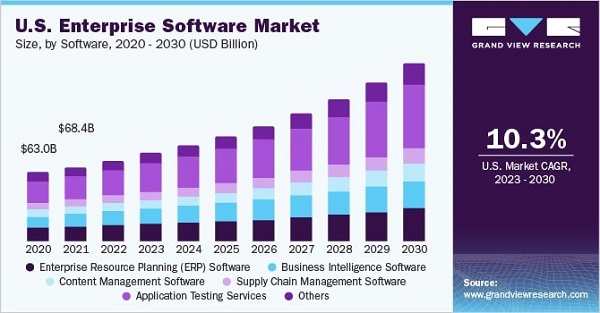
    The market for enterprise software was estimated at USD 216.69 billion in 2022, and from 2024 to 2030, it is anticipated to increase at a CAGR of 11.5%. The increase in spending by end-use businesses on enhancing their digital infrastructure and advancements to cloud analytical tools are both responsible for the expansion. Enterprise software also allows for studying structured and unstructured data, which helps companies recognize current industry trends and generate valuable insights to support market growth. Due to the strict safety regulations imposed by the majority of governments, the giant COVID-19 virus spread in the first half of 2020 had a negative effect on the market in the first two quarters.

    Enterprise software’s high opening costs and emerging digital dangers are significant obstacles to market expansion. To increase the application’s effectiveness and dependability, the market participants must engage in R&D, raising the program’s price. The rise in cyberattacks, such as viruses, Distributed Denial-of-Service (DDoS), ransomware, and Corporate Account Takeover (CATO), is also having an effect on the sales of enterprise software. The market players are collaborating with various security technology providers to increase the security of their enterprise software to tackle these concerns. Also, it lowers the initial expenses of the Software; these businesses are also concentrating on supplying customized enterprise software according to client’s needs.

    Ten Cutting-edge Enterprise Software Trends That Will Help You Boost Your Business

    As you are aware, the landscape of enterprise software is changing rapidly due to rapid technological improvements, making it essential for business owners to keep up with the latest advancements in this area. Emerging trends like robotic process automation (RPA), machine learning, and artificial intelligence (AI) are becoming increasingly common today. By adhering to automation and data-driven solutions, these technologies assist enterprise applications in being optimized to meet evolving company demands. We highlighted some essential enterprise software trends below to assist decision-makers in driving modernization, enhancing productivity, and optimizing company operations. Let’s go over each one individually.

    1. Cybersecurity

    Cybersecurity is a realistic topic for 2024 enterprise software trends. Due to the increasing dependency of businesses on technology for the storage and management of sensitive data, cybersecurity has emerged as a critical issue in developing enterprise software. Due to the increase in cybercrime and data breaches, enterprises must put strong cybersecurity measures in place to safeguard their systems and data.

    Integrating security features into software design and development processes is vital to enterprise software development cybersecurity. To protect against cyber threats, this entails installing firewalls, encryption, multi-factor authentication, intrusion detection and prevention systems, and other security measures.

    Additionally, cybersecurity in enterprise software development requires frequent security tests and assessments to pinpoint vulnerabilities and strengthen security measures. Maintaining Software with the latest security patches and updates is also crucial.

    Enterprise software development benefits from a robust cybersecurity framework that helps protect sensitive corporate data and systems availability, integrity, and confidentiality. Additionally, it promotes confidence among customers and clients who rely on the enterprise to protect confidential information.

    Therefore, cybersecurity is a crucial component of enterprise software development, and enterprises must prioritize it if they want to protect their systems and data from online assaults.

    2. Robotic process automation (RPA) and automation

    One of the main topics you should be aware of while updating enterprise software is robotic process automation (RPA); by modeling human interactions with software systems, rule-based and monotonous opportunities can be automated using RPA tools. Robotic process automation has been shown to increase operational efficiency in businesses. Automated procedures reduce the possibility of human error, which helps employees save time overall.

    Using RPA for data entry, invoice processing, report production, workflow automation, and data extraction will be helpful. Additionally, as more companies want to streamline time-consuming business processes, RPA use cases and adoption will keep expanding in future years.

    3. Machine learning and artificial intelligence

    Machine learning (ML) and artificial intelligence (AI) are two powerful technologies that have revolutionized the market and established actual trends in enterprise software. While ML is a subset of AI that involves training servers to recognize patterns and make decisions based on data, AI is the ability of robots to carry out activities that traditionally require human intelligence.

    There are numerous advantages to incorporating AI and ML into enterprise software development, including:

    1. Automation

    Data input and customer support are examples of monotonous tasks that AI and ML can automate, freeing up human resources for more complicated work.

    2. Improvement in the capacity to make decisions

    AI and ML algorithms can assist businesses in making more informed decisions and predictions by analyzing vast volumes of data.

    3. Personalization

    Enterprise software may now be tailored to the unique requirements of each user or client using AI and ML, offering a personalized experience.

    4. Preventing future issues

    Businesses can use AI and ML to predict when machinery or equipment might go down, enabling preventative maintenance and reducing downtime.

    5. Increased efficiency

    AI and ML can assist businesses in operating more effectively and cutting costs by automating tasks and enhancing decision-making.

    However, there are challenges with integrating AI and ML into enterprise software development, such as the necessity for an abundance of data to train algorithms, the possibility of bias in judgments, and the requirement for experts to create and maintain the technology.

    Despite these challenges, it is anticipated that AI and ML will continue to play a significant role in the development of enterprise software, stimulating innovation and assisting businesses in maintaining their competitiveness in a growing digital world.

    4. Leveraging the Use of VR and AR Capabilities

    Platforms for augmented reality (AR) and virtual reality (VR) are gaining popularity as more businesses combine them with enterprise software applications. The capabilities of AR and VR are being used by manufacturing, healthcare, retail, and other sectors to offer adequate training, hands-on activities, and immersive experiences. Use augmented reality (AR) technology to expand your business beyond flat displays and personalized notifications, as every industry is focused on bringing change by adopting futuristic technologies.

    AR/VR platforms can be used by businesses to build virtual training environments, imitate real-world situations, and enable teams to collaborate in an immersive and exciting way. By utilizing enterprise software trends like augmented reality and virtual reality, businesses can provide consumers with engaging features and experiences and enable them to make informed decisions by testing out various possibilities.

    5. Edge Computing

    The way data is processed, analyzed, and managed in enterprise app development has undergone a paradigm shift with edge computing. This top enterprise application trend involves processing data closer to its source, at the network’s edge, instead of sending it to a centralized data center. This strategy has grown in popularity because of the development of IoT devices and the demand for real-time data processing.

    Small sensors to tremendous servers can all be used as edge devices in edge computing to process data. These gadgets are linked to the cloud, where data processing and analysis are possible. This enables quicker data processing, lower latency, and greater effectiveness.

    Edge computing has advantages in terms of privacy and security as well. Compassionate information can be processed locally, keeping it on the local network and lowering the risk of data breaches. Furthermore, edge devices can analyze security risks in real-time and react to them quicker than centralized data centers.

    Edge computing implementation can be complex, too. Because they frequently have low processor speeds and memory capacities, edge devices may need help to handle complicated data processing tasks. Edge devices are challenging to manage, requiring specialist software and IT skills.

    Despite these difficulties, edge computing has emerged as one of the most popular enterprise application trends, finding use in the manufacturing, healthcare, and logistics sectors. Edge computing is projected to be used increasingly frequently as more businesses adopt IoT devices and the demand for real-time data processing expands.

    6. Internet of Things

    “Internet of Things” (IoT) refers to connecting devices and sensors to the Internet. IoT plays a more significant role in enterprise software development as companies seek ways to increase productivity, cut expenses, and generate new revenue. Organizations can use real-time data and insights from IoT-enabled devices to improve decision-making and automate procedures.

    Remote device monitoring and management is one of the main benefits of IoT in enterprise application trends. This can range from automating temperature control in a warehouse to tracking inventories and monitoring equipment performance. Businesses may spot patterns and trends by gathering and analyzing data from these devices, which enables them to streamline processes and boost overall productivity.

    Developing new goods and services is a significant additional application of IoT in enterprise software. IoT-enabled sensors, for instance, can be used to keep monitors on the condition of industrial machinery, allowing companies to anticipate when maintenance is necessary and minimize downtime. IoT can also be used to develop intelligent buildings, where sensors observe energy use and enhance HVAC systems.

    Of course, there are difficulties with IoT in enterprise software development, just as there are with any technology. Since IoT devices are frequently attackable, cybersecurity is one of the main concerns. Businesses must implement rigorous safety protocols and ensure that all devices have the most recent firmware and Software patches to mitigate this risk.

    7. Blockchain

    Enterprise software Trends 2024 show that blockchain technology provides an opportunities to the businesses to quickly gain popularity and revolutionizing a wide range of sectors, including enterprise software development. With blockchain, essentially a distributed ledger system, multiple parties can conduct secure and transparent transactions without an intermediary. The following are some of the ways that blockchain is influencing the development of enterprise software:

    1. DApps, or decentralized applications

    Blockchain-based decentralized applications (DApps) are gaining popularity because they provide decentralized control and transparency. Programmers increasingly use blockchain technology to build decentralized, tamper-proof, and more secure DApps than traditional applications.

    2. Smart Contracts

    Self-executing contracts with the agreement conditions specified in the code are known as smart contracts. Using blockchain technology, developers may design intelligent contracts that automatically carry out transactions and enforce the contract terms without a mediator’s assistance.

    3. Supply Chain Management

    By creating a tamper-proof record of each transaction in the supply chain, blockchain technology can help improve supply chain management. With less chance of fraud and counterfeiting, this can assist businesses in tracking products from the point of origin to the end of the sale.

    4. Identity Management

    A decentralized and secure system for managing IDs can be created using blockchain technology. This can assist companies in managing consumer data more effectively and protecting against fraud and identity theft.

    5. Management of Data

    Data management may be improved, and the danger of data breaches decreased by using blockchain technology to build secure, decentralized databases. This can assist businesses in managing sensitive data more effectively, including customer and financial records.

    As a result, blockchain technology is revolutionizing enterprise software development by allowing coders to build more transparent and secure systems. We may anticipate seeing even more cutting-edge blockchain applications in the production of enterprise applications as technology progresses.

    8. No-code or low-code Platforms

    Enterprise software development is quickly changing due to low-code/no-code platforms, which enable businesses to build customized software applications with little to no coding. These platforms make it simpler for non-technical users to create and deploy applications fast by providing an intuitive visual interface, drag-and-drop components, and pre-built templates.

    The fundamental advantage of no-code/low-code development is the quickness with which apps may be created and deployed, cutting off the period and expense involved with conventional development techniques. Due to these platforms, more business and IT teams can work together, and business users can design and modify apps without specialized technical knowledge.

    The scalability of low-code/no-code platforms, which allows applications to be readily scaled to suit changing business needs, is another benefit of these enterprise application development trends. Additionally, these platforms have built-in security and compliance features that guarantee that apps adhere to legal standards and are safe from threats from the web.

    Low-code/no-code platforms may not be able to handle sophisticated applications or system integrations, which is one of its drawbacks. Additionally, businesses could only have limited customization possibilities and depend on vendor assistance for upgrades and maintenance.

    Low-code/no-code platforms enable businesses to develop custom applications while quickly lowering costs and encouraging collaboration. In general, these platforms offer substantial advantages for enterprise software development. These platforms will become even more common in the enterprise software development landscape as they evolve and grow better.

    9. Cloud computing

    The way enterprise software is developed, distributed, and managed has been entirely revolutionized by cloud computing. Enterprise software used to be included on-premise, which required substantial costs for IT staff, software licensing, and infrastructure. Enterprise software trends are being led by cloud computing, which enables Software to be accessible online, eliminating the need for on-premise infrastructure and cutting costs.

    Enterprise software development benefits from cloud computing include:

    1. Scalability

    Enterprise software may scale up or down dependent on demand due to cloud computing. Enterprises may easily add or subtract resources as needed, lowering costs and boosting productivity.

    2. Flexibility

    Enterprises using cloud computing have a range of deployment choices to choose from, including public, private, and hybrid clouds. This enables enterprises to customize their deployment methodology to suit their unique requirements.

    3. Accessibility

    Enterprise software may now be accessed from anywhere, at any time, and on any device as a result of cloud computing. Making remote work possible and making data sharing simple increases cooperation and productivity.

    4. Security

    Robust security procedures are in place at cloud computing providers to protect enterprise data and Software from online threats. Data breaches and other security risks are less likely as a result.

    5. Cost-effective

    Cloud computing additionally cuts costs on software licenses and IT workers by doing up with on-premise infrastructure. This enables businesses to concentrate their resources on critical business operations.

    The creation of new categories of enterprise software, including Platform-as-a-Service (PaaS) and Software-as-a-Service (SaaS), has also been made possible by cloud computing. These models provide even more scalability and flexibility, enabling businesses to quickly adopt new technology and respond to shifting customer demands.

    By providing more scalability, flexibility, accessibility, security, and cost savings, this technology has revolutionized enterprise software development. Businesses that adopt cloud computing are in an excellent position to keep on top of the constantly evolving digital landscape.

    10. Integration of Data Analytics and Business Intelligence

    For businesses to make wise and prosperous decisions, leveraging data analytics and incorporating corporate business intelligence tools like Power BI can be helpful. You may acquire precise and accurate insights from massive datasets using business intelligence and data analytics capabilities in enterprise software. You can also find valuable patterns, trends, and correlations that can be used in corporate plans and planning. In fact, you can create a data-driven organization by utilizing the power of data analytics.

    With data analytics and business intelligence integration, businesses can better understand customer behavior, market trends, user interest, and performance metrics. This trend in enterprise software, among others, can help your enterprise application stay ahead in today’s data-driven marketplace by fast adapting to changes in the market, spotting emerging trends, and boosting innovation.

    Opportunities and Challenges for Businesses and Developers

    The following significant problems are just a few that the enterprise application development company must deal with.

    1. Frequently Changing

    One of the enormous difficulties for enterprise software developers is that the client’s business needs constant modifications.

    2. Security Activities

    It protects the security of the client’s corporate data and other vital information; the app development process must adhere to established protocols.

    3. Integrated Third-parties

    When integrating third-party features and functionality into custom Software, enterprise application development services must overcome various challenges.

    4. Technological Advancement

    The modern technology of today can be obsolete tomorrow. The development of complicated Software is faced with a significant problem due to the quick and sudden shifts in technology trends.

    5. Data-related Concerns

    Data storage and safe access issues are among these concerns. Enterprise software development companies need to take aggressive steps to overcome these issues.

    Enterprise software development services, however, can help entrepreneurs explore new prospects. Custom Software can speed up and streamline business operations. Additionally, it can provide organizations the scalability and flexibility they need to expand. With smoothly operating enterprise software, executives may take new chances and diversify their business models.

    Conclusion

    These trends demonstrate the value of technology in streamlining operations, increasing effectiveness, and strengthening security measures. Enterprise software will remain essential to companies’ success as they adapt to the digital environment.

    BOSC Tech Labs excels at creating cutting-edge enterprise software solutions that use cutting-edge technologies like blockchain, artificial intelligence, machine learning, and cloud computing. Our experienced technologists follow the most recent developments and use this information to provide advanced, long-lasting software solutions. Because we are experts in these cutting-edge technologies, you may leverage the power of digital transformation to obtain a competitive advantage and optimize your business operations with best practices in the industry. We allow you to take advantage of the opportunities the ever-changing technology world provides. Get a free project consultation by getting in touch with us!

    Frequently Asked Questions (FAQs)

    1. What does Software enterprise development mean?

    The development of enterprise software for companies is the primary objective of the specialist field of software engineering known as enterprise software development. These large-scale functions, like enterprise resource planning, customer relationship management, and analytics, are often supported by this enterprise software.

    2. How will software development develop in the future?

    Our hopes for the future are that software code will automate a great deal of employment globally and that AI, machine learning, and data science will impact all fields. Experts in software engineering will be required to develop, maintain, and enhance the functionality of all Software used worldwide.

    3. Who makes use of enterprise software?

    Enterprise software is used by businesses to increase client interaction and provide effective customer service. For instance, the market leader in financial Software, Intuit, built an omnichannel cloud contact center using Amazon Connect to integrate consumer communication channels like voice, chat, messaging, and the web.

    Book your appointment now
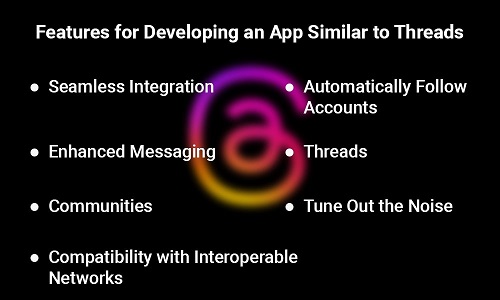
  • A Complete Guide to the Differences Between Web Apps and Cloud Apps

    A Complete Guide to the Differences Between Web Apps and Cloud Apps

    Modern businesses would find it difficult to stay ahead without employing various technologies and continuously upgrading them. Numerous apps are now a simple method to access the advantages of the digital society. Companies may need to decide between web and cloud applications due to the increasing popularity of different applications.

    Both present lucrative possibilities. According to research, market revenues for public cloud services surged to $126 billion in Q1 2022, a 26 percent rise from Q1 2021. The last few years have seen an ongoing rise in web app income.

    If each choice has advantages and disadvantages, which should you pick for the business requirements? It would be best if you thoroughly examined these solutions to find an answer to the following question.

    BOSC Tech Labs has years of experience developing websites and cloud-based applications. As a result, we have offered our in-depth information to make the distinction between both concepts easier for you. After reading this article, You can select an effective strategy for your particular business needs. So keep reading!

    Overview of Web Application

    What if we told you that you utilize web applications daily? You might be stunned. A web app is developed for web browsers on smartphones, laptops, and computers. Since these pages are usually used to acquire a service, a web application includes specific information and some buttons or windows.

    Because they emerged and developed differently, the conflict between cloud application development and web application development begins there. For many years, the phrase server-based computing has been in use. The basic goal of developing web applications is to host data on an individual computer, sometimes a server. Clients could thus use their laptops or smartphones to share their resources with others.

    High-quality web app development requires a high level of subject knowledge. Thus, feel free to contact BOSC Tech Labs if you have a solution idea and need a technological partner to make it a reality. To fulfill the constantly changing needs of modern businesses, we thoroughly examine your company’s needs before offering a variety of acceptable options, developing an MVP and testing it, and then creating a finished product. We also offer maintenance services in this process.

    To choose between a cloud application and a web application, it is important to consider the benefits and drawbacks of web technology. Web apps are, therefore, popular among users for the reasons listed below:

    Benefits of Web Apps

    1. Adaptivity:

    It is well known that web apps don’t require a particular operating system. They can therefore operate on any operating system and are accessible to all users. Additionally, it is less expensive because there is no need to create programs, particularly for every operating system or browser.

    2. Nothing needs to be downloaded or installed:

    Furthermore, because all updates take effect when the page is reloaded, you may quickly optimize and modernize an interface at any moment.

    3. High-security level:

    The main advantage is that there is just one entry point for the web application, indicating a high level of security. Because everything can be set up easily and with a high level of security, web-based and cloud-based apps have a clear advantage.

    4. Security of data:

    All client information is stored in the cloud so that the hosting company can guarantee its security. Clients need not worry about their data spreading as a result. Web applications also provide security against data loss.

    5. Availability:

    The accessibility of web applications has its pros. We can all agree that using applications on various gadgets, including PCs, laptops, tablets, and smartphones is convenient.

    Drawbacks of Web Apps

    • Complicated UX building processes and browser compatibility issues. As a result, while developing a product roadmap, you must gather much information on usage patterns and performance metrics.
    • Decreased performance of Web application functions with less efficient and less responsive than other applications.

    Introduction of Cloud Application

    An online connection is necessary for cloud applications to operate properly. By using a browser, customers may also have further access to them. When a machine or application, sometimes called a server, is created to handle network resources, that technology is called server computing. Another application, sometimes known as a client, submits requests to servers, which accept and respond to such requests. The cloud is used to store, analyze, and access the data used by these programs.

    Let’s look at cloud apps’ major benefits and drawbacks to understand better their unique characteristics and why 94% of businesses already use cloud solutions.

    Benefits of Cloud-Based Applications

    1. Improved collaboration:

    Users may collaborate effortlessly, and access shared storage when all the crucial data is kept in the cloud.

    2. Lower expenditures for maintenance:

    Cloud apps cost less money to maintain in terms of software and hardware, hence requiring less funding.

    3. Storage capacity is virtually infinite:

    Cloud apps are fantastic for businesses that need to safely store and conveniently access large volumes of data, including documents, music, video, and photos.

    4. Huge potential for scaling:

    Cloud apps are what you need if you want your app to scale quickly without compromising speed and security.

    Drawbacks of Cloud Apps

    • The drawbacks of vendor lock-ins for cloud applications. When switching cloud service providers, businesses could experience issues.
    • It is necessary to disclose private information to third parties. You should know that even if most cloud service providers use modern security measures, you still share sensitive information with cloud vendors.

    Cloud service providers entirely own cloud infrastructure. As a result, you will not have total control over how services are delivered within a cloud architecture.

    The main difference between Web applications and Cloud applications

    Let’s explore the main differences between cloud and web applications to determine which kind suits your unique business requirements.

    Differentiations
    Factors Cloud apps Web apps
    Technology Performance-focused JavaScript-based frameworks like Nodes, React.JS, and Angular are used to create applications. To build web apps, you’ll need to use back-end programming languages like PHP, Python,.NET, and Ruby, as well as web technologies. Additionally, you’ll need to use remote databases like PostgreSQL, MySQL, and SQL Server.
    Security All cloud service providers encrypt all the data in the cloud using various security methods. Businesses must remember that they share sensitive data with cloud service providers. You have complete control over how all data is stored and processed, and all client information is verified on the authentication servers of web apps.
    Scalability Cloud applications are excellent for businesses that require a lot of scalability. The scalability possibilities of web apps are limited and expensive.
    Categories Solutions for team communication and file sharing are a few examples. Several well-known cloud applications include Evernote, Salesforce, Dropbox, Zoho, and Yahoo. Some examples of web apps are WebEx solutions, banking, social media, and e-commerce. One well-known web application is eBay.
    Internet Cloud applications don’t always require an internet connection. Web apps can only be used with an internet connection and a web browser.
    Development cost Although designing a cloud app is more expensive, storing large amounts of data in the cloud instead of on servers is less expensive. The cost to design a web app is lower. However, you’ll need to make large investments in growing the number of servers if you want your solution to share and process a lot of data.
    Availability Cloud apps provide simple user collaboration because they can be used from any device or browser Only a web browser with an internet connection is required to access web apps, and there are few possibilities for teamwork available.
    Solution Cloud apps are multi-tenant and easily customizable to meet the varying needs of users and businesses. There aren’t many multi-tenancy alternatives available in web apps.

    Cloud vs. Web Application: Which Should You Select?

    It’s time to decide which would be most beneficial for your organization once you grasp the differences between cloud applications and web apps:

    Smaller businesses typically choose web solutions when they want full control over the functionality, usability, and security of the data owned. However, by keeping everything on your servers, you risk facing downtimes if something goes wrong with your servers. You also reduce your ability to scale, as it gets more expensive to set up, run, and maintain all the servers as the amount of data increases.

    Big enterprises committed to quick growth and desiring infinite scalability frequently select cloud apps. This strategy guarantees that you can develop at any reasonable pace, always have access to all the data, and that the likelihood of app crashes is nearly minimized. However, while adopting this strategy, you keep all the sensitive data with a third-party vendor. Therefore, you must be very careful when choosing a cloud service provider.

    Since selecting between web-based and cloud-based applications can be challenging, plenty of companies opt for a hybrid strategy. For procedures that demand the highest level of security, you can use web-based applications, whereas cloud applications are best for those that would suffer greatly from app crashes.

    Conclusion

    Customers are interested in the cloud computing vs. web application debate because both apps perform well.

    Web applications and cloud applications have few significant differences. The distinction results from the many functional similarities between web applications and the cloud. There are, however, also important differences, particularly when using cloud applications for redundancy rather than computational power.

    Web apps would therefore be a smart alternative for smaller tasks. Cloud applications are typically made for more complicated tasks. Ultimately, most businesses combine them, so your choice should align with your objectives.

    BOSC Tech Labs has extensive experience developing cloud and web applications for various industries and has been in the bespoke software development business since 2010. As a result, we can quickly determine what kind of application you need to create to achieve your long-term company objectives and the quickest and most affordable way to carry out the development process.

    You can see a complete list of the projects we’ve worked on and learn how we address the toughest difficulties by looking through our portfolio.

    Frequently Asked Questions (FAQs)

    1. What are the top 3 reasons for using the cloud?

    The top 3 reasons for utilizing the cloud are

    File storage: You can save any data and information on the cloud, including emails and files.
    File sharing: In cloud computing, sharing any file with several users is simpler.
    Backup of data: If your system is lost, damaged, or stolen, you can still protect your data and files because of cloud storage.

    2. What distinguishes a web application and cloud application?

    Cloud and web apps have quite different architecture.. A web application or web-based program must be continuously connected to the internet to operate. On the other hand, a cloud application or cloud-based program handles processing on a local workstation or computer.

    3. Why do we need web apps?

    It helps organizations to provide their customers with a personalized experience, which may increase consumer satisfaction and loyalty. The future of web development lies in adaptable web apps. They allow consumers to alter the website’s appearance and feel according to their preferences.

    Book your appointment now

  • How To Create A Threads-Like App: Everything You Need To Know?

    How To Create A Threads-Like App: Everything You Need To Know?

    Want to learn how to create a Threads-like app? Threads, a just-launched application, seems like Twitter. Users can interact, collaborate, and share information on current trends using the app. Threads, an app that will revolutionize how we communicate in today’s fast-paced digital world, is being released by Meta, the parent company of Instagram.

    Publishing text updates, having open discussions, and communicating with people who have similar interests are all made possible through Threads. Threads are a way to take advantage of the instant messaging revolution and improve online communication and interaction.

    This blog will discuss the Threads application’s features and functionalities. We explain in-depth how Threads differs from Twitter and other social media platforms. We will also examine how much it costs to create Threads and how effective the new platform is.

    Worldwide number of new Threads subscribers as of July 10, 2023

    On July 5, 2023, the meta platform Threads was introduced. Within the first two hours of Threads’ introduction, 2 million users signed up, and 30 million people now utilize the new social site, according to Statista. The website allows users to send posts longer than 500 characters, and it has numerous Twitter-like features and capabilities verified by users’ Instagram profiles.

    Instagram Threads: What Are They?

    Instagram just released Threads, a text-based social media application. It is a brand-new mobile application created by Meta with features comparable to those of Twitter. A text-based and microblogging platform is how the Threads app functions. Along with the flexibility to publish images, videos, and links, users can share updates up to 500 characters long.

    The general functionality of it parallels that of Twitter. On the other hand, the Threads app stands out in several unique ways. This application is more than just a text-based one. Users can express their thoughts and participate in conversations with its help. Users receive an intuitive interface that enables them to interact with an extensive audience through short text-based communication.

    Critical Features for Developing a Thread-like Application

    Due to its distinct features and focus on establishing interactions between individuals, Thread is a platform that stands out alone. Through its innovative approach to interaction online, Threads allows users to create communities around shared interests. When creating a text-based application like Threads, the following significant characteristics can be implemented right away:

    1. Seamless Integration:

    Users can sign up for Threads using an existing Instagram account, making it simple to connect with Instagram friends and followers inside the app.

    2. Automatically Follow Accounts:

    When you’re on Threads, you can set the app to automatically follow all the accounts you already follow on Instagram as soon as they sign up, ensuring that you stay in touch with the people that matter to you. On the home page, you can look for other accounts to follow and browse their posts and content.

    3. Enhanced Messaging:

    You can share texts, quotes with a maximum of 500 characters, images, links, and videos up to five minutes long with Threads. You can link your Threads account to other apps while using the app to share content on Instagram stories.

    4. Threads:

    The app’s user interface is recognizable and similar to Twitter’s. It includes short text-based content, like and repost buttons, and a thread-quoting feature that works like retweeting but with quotes.

    5. Communities:

    Thread is a platform that aims to establish vibrant communities where users can engage in meaningful conversations and meet others with similar interests. Users of social media apps can gain a loyal following and communicate their thoughts, opinions, and creativity to a global audience.

    6. Tune Out the Noise:

    Threads’ “Turn Out the Noise” function allows users to take command of their chats. One of the Threads app’s most popular aspects is letting users personalize their experience by choosing who can mention or reply to them, filtering out comments containing specific phrases, and keeping track of profiles by blocking, limiting, unfollowing, or reporting. Any accounts blocked on Instagram will also automatically block Threads, ensuring users only engage in positive and targeted conversations.

    7. Interoperability with Compatible Networks:

    The ActivityPub protocol, an open social networking standard created by the World Wide Web Consortium (W3C), will be supported by Threads. Threads can connect to other ActivityPub-using systems like Mastodon and WordPress as a result of this interoperability. Threads create additional opportunities for connections and interactions that are usually impossible on most social apps because of their interoperability. As a result, users can interact with a more extensive network across many platforms, promoting a more inclusive and expanding social experience. To create applications like Threads, interoperability across several networks is necessary.

    Schedule an interview with iOS developers

    Steps to Make a Profile and More

    When developing an app like Instagram Threads, it’s crucial to know the essential features and functionalities to provide users with a seamless and engaging experience and influence the threads app development cost. Processes for developing social media apps are crucial to building completely functional applications. Let’s look at making a profile, following and unfollowing users, and starting a new discussion.

    1. Profile Creation

    Creating a profile is the first step in establishing a user’s presence within the app. Allow users to create individual profiles by allowing them to add vital information such as username, profile photo, and bio. You may encourage personalization by enabling users to upload cover photos, themes, or stickers that reflect their unique personalities to their profiles. A person can interact and express themselves in a stimulating environment when they have a visually appealing profile page.

    2. Follow and Unfollow functionality

    A follow/unfollow option is necessary for promoting connections and providing users control over their network. People should have the choice to follow or unfollow other individuals to manage their feeds and the content they view. Ascertain that the user interface is easy to navigate and provides options for searching for specific people or browsing suggested accounts based on shared interests.

    3. Develop Thread

    Users can start new Threads on Instagram Threads and share them with followers using the New Thread option. These posts could have text, links, videos, and pictures. By changing the privacy settings, users can limit who has access to their postings. They can choose whether they want to be able to engage with simply the profiles they follow or only the mentioned profiles. It gives a tailored and controlled approach to communicating with others.

    4. Select a search option

    Users can enter search terms to locate any user profiles and postings using the search feature available in the Threads application’s navigation bar.

    5. Emoji reactions to Threads

    In order to respond to specific messages within a thread, use a choice of emojis. Let your friends know your feelings about their communications without interrupting the conversation.

    6. Feature for Thread Mentions

    In a packed thread, how do you get someone’s attention? Use the @mention tool to notify specific individuals. They will receive a in-app notification, ensuring they get all the essential messages.

    7. Discuss Third-Party Applications

    On Instagram’s most popular platform, users can share Threads directly. This feature allows users to connect the two applications easily and share conversations and experiences with a broader audience.

    You should hire iOS or Android app developers from a reputable app development company with a skilled team of designers and developers who can create social media apps if you want to acquire highly functional social media applications similar to Threads.

    How is Twitter different from Threads?

    A comparison between Twitter and Threads, along with a list of significant differences:

    Differentiations
    Twitter Threads
    Users of Twitter are only allowed 280 characters per post. In addition, Twitter offers extra services for $8 a month. After subscribing, users can have up to 25000 characters. According to Meta, Thbreads will let users share posts that are longer than 500 characters. There is no possibility to subscribe for additional features with Meta.
    Without a desired blue badge, Twitter users can submit two minutes and 20 seconds long videos. Five-minute videos can be published by users on Threads.
    There are recommendations and current trends on Twitter’s homepage, but one way to explore Threads is by navigating through the home feed. Threads don’t have a post-draft feature at launch like Twitter.
    Sixteen years ago, Twitter made its website launch. It also gained popularity in this way. However, smartphones’ quick adaptability made the app available on both iOS and Android. Only a mobile app from the iOS and Android app stores is now available for Threads. As a result, it can only be used on mobile devices. Given the popularity of Instagram as an app, Meta is following your steps; thus, the Threads website might be unavailable for a while.
    Users can sign in to Twitter using their username, email address, or mobile number. Other than using your Instagram account, there is no other way to access Threads. Your personal Instagram account must be deactivated to delete Threads.

    How to Develop an App Similar to Threads?

    Finding mobile app developers who provide end-to-end development solutions will help you compete for the unique features that others are still looking for when developing a social media app similar to Threads.

    Now, we examine the thorough procedure to develop social media applications that are reliable and scalable, comparable to Threads.

    Step 1: Market analysis and research

    Understanding the market analysis and noting the essential volume and value figures is crucial before developing an application such as Instagram’s Threads. Try to gain knowledge of important elements like target markets, regulations, entry barriers, trends, user preferences, market competition, engagement patterns, and more.

    Step 2: Prototype

    After completing the research process, create a blueprint for your text-based app, taking into account the visual layout and storyboarding. Clearly describe the app’s screen features, navigation, and feasibility to develop the user experience and interface.

    Step 3: Designing UI/UX

    After deeply understanding all the critical app components, the talented design team begins by offering an appealing and user-friendly layout and appearance to assist in attracting clients. Two crucial design considerations are the app’s usability and incorporating the brand’s voice to make it aesthetically appealing. You can work with a mobile app development company with a team of experts dedicated to developing outstanding applications.

    Step 4: Application Development

    After the design component has been clarified, the project is given to the developers, who next select the crucial tech stack, which consists of programming languages and development frameworks. Engineers offer the elements required and integrate APIs, server databases, and other technologies to increase usability, scalability, performance, and compatibility. Numerous app development companies provide highly scalable solutions that respond to client needs.

    Step 5: Testing & Quality Assurance

    Numerous tests must be done before a new application is released to achieve high quality at an affordable price. The functionality, user interface, performance, bugs, and other issues that may prevent the app from offering a flawless user experience are all evaluated during testing. The best mobile app development companies have a skilled QA team who test every application feature to see if it can be used and fix any additional bugs.

    Step 6: Support & Maintenance Post Deployment

    The app is now ready to launch on several platforms according to proper app titles, descriptions, categories, keywords, launch icons, and app store images. Experts monitor the app’s functionality across all platforms, user feedback, problems, and relevant updates after its release. Engage devoted developers from top app development businesses to monitor and assist your application after deployment.

    How Can an App Like Threads Earn Money?

    In this quickly growing social media environment, text-based messaging apps like Threads and Twitter are becoming increasingly popular, earning millions of dollars just hours after their releases. But how can you monetize a platform like Twitter or Threads? Let’s move on to it now:

    Since Threads’ release, Meta hasn’t added any revenue-generating features. Here are some of the several monetization options you can explore if you want to release a text-based social media app:

    1. Advertising: You might start earning money right immediately by using the app’s tailored advertisements, sponsored content, and paid partnerships with enterprises.

    2. In-app Purchases: Premium features, exclusive material, etc., can be made available to users as in-app purchases.

    3. Premium model: It allows you to provide a free basic version of an app similar to Threads while charging a monthly fee for premium features like verified tagging and expanded functionality.

    4. Collaborations with Influencers and Sponsored Content: Work with businesses or influencers to promote content on the app through sponsored posts.

    Schedule an interview with Android developers

    How much does it cost to create an app similar to Threads?

    An app like Threads might cost anything from $60,000 to $400,000. However, the features and other factors play a significant role. Large-scale mobile app Threads has advanced security procedures and API integration. So, it would be best to contact a mobile app development company or firm to get a better idea of how much it would cost to create an app similar to Threads. They would provide an estimate based on your budget and the app’s needs.

    Conclusion

    Meta’s Threads app can revolutionize live-streamed discussions by giving users a distinctive platform for engagement and connection. This page extensively covers the Threads’ characteristics, advantages, and capabilities. As a leading mobile app development company, BOSC Tech Labs has a team of professionals who develop cutting-edge social media apps like Threads tailored to particular sectors’ needs. You can use the expertise of experience to generate top-notch app development solutions by hiring app developers from social media app development companies. We provide user-friendly, highly scalable, and cost-effective app development solutions.

    Frequently Asked Questions (FAQs)

    1. How do meta-threads work?

    News and politics have been minimized on Meta’s Threads, a Twitter clone. By downplaying news and politics, Meta’s new app Threads hopes to be a kinder alternative to Twitter. However, partisan disputes on Twitter are a significant draw for many users.

    2. What is the thread app for Instagram?

    A text-based chat app called Instagram Threads was introduced on July 5, 2023. I first found the Threads experience to be very similar to Twitter. Both platforms provide users with a feed of text-based updates that let them keep up with the news and create their conversations.

    3. Who is Threads’ owner?

    Meta Platforms owns and runs the American social media and networking site Threads. Users of the app can post and share text, photographs, and videos and respond to and like the posts of other users.

    4. Are there any particular marketing strategies or methods that might be used to promote a Threads-like app?

    Yes, of course! Text-based software like Threads can be promoted in various ways, including application Store Optimization (ASO), social media marketing, content marketing, public relations, app preview videos, partnerships, and many other strategies. You can also look at our digital marketing services to learn more about how we can help you.

    Book your appointment now
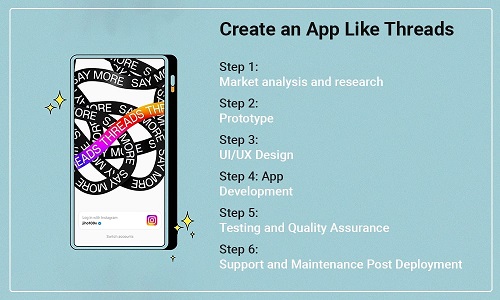
  • Node Streams: An Early Look

    Node Streams: An Early Look

    Node Js applications may efficiently route and handle input and output data using Node Streams. By using Node Js streaming, entrepreneurs may enhance the functionality, scalability, and maintainability of Node Js applications that deal with massive volumes of data. For a deeper understanding, learn about the different types of streams in Node Js and how to use them in a tutorial. Analyse Node Stream piping and chaining.

    Define Streams in Node Js

    Data that may be read or written consecutively can be manipulated using streams, which are abstract user interfaces. Streams are a crucial feature in Node Js used to manage data flow between input and output sources.

    Streams are vital in Node Js frameworks because they make managing massive quantities of data efficient. Streams are a crucial idea in Node Js frameworks. The data is processed in sections as it becomes accessible through streams instead of being loaded into memory all at once. Without storing all of the data in memory at once, data can be streamed in real time from a source (like a file or a network socket) to a destination (like a reply object or an additional file).

    For instance, one may read from or write to a stream from and to numerous data sinks, files, network connections, and stdin/stdout.

    1. The Stream Module

    The stream module is an essential module in Node Js that offers a way to manage streaming data. It provides a set of APIs for generating, reading from, and writing to streams.

    2. API for NodeJs Streaming

    The Node Js Stream API is a collection of APIs that provide users with a means to manage streaming data. A selection of classes and operations for generating, reading from, and writing to Node streams are offered by the Stream API.

    The following are the primary elements of the Node Js Stream API:

    1. Stream Classes:

    Classes for interacting with Node JS streams are provided by the Stream API, including the Readable, Writable, Duplex, and Transform classes. These classes offer many stream types with various functionalities.

    2. Stream Methods:

    The Stream API offers several ways to deal with streams, such as the pipe() function for establishing connections between written and readable types and the onData() method for managing a data event or more.

    3. Events:

    ‘data,’ ‘end,’ ‘error,’ and ‘finish’ are just a few of the events that streams may deliver and are provided by the Stream API. These events are applied to various stream-processing tasks.

    4. Stream Options:

    It is used for customizing streams, including changing the high watermark for written streams or the encoding for readable streams via the Stream API.

    Node Stream Types

    Each of the four types of streams—Readable Node Js Streams, Writable Streams, Duplex Streams, and Transform Streams for Node Js applications—has a particular use.

    Let’s examine the Readable Node Js Stream illustration.

    1. Reading Stream

    Readable streams are utilized to read data from a source, such as a network socket or a file. When fresh data becomes available, they send a “data” event; when the stream is finished, they produce an “end” event. ‘fs.createReadStream()’ and ‘http.IncomingMessage’ are two examples of readable streams in Node.js that may be used to read files and HTTP requests, respectively.

    Let’s use an example to understand the Readable NodeJs Stream further.

    const fs = require('fs');
    
    // Create a readable stream from a file
    const readStream = fs.createReadStream('example.txt', { encoding: 'utf8' });
    
    // Handle the stream's 'data' events
    readStream.on('data', (chunk) => {
      console.log(`Received ${chunk.length} bytes of data.`);
    });
    
    // Handle the 'end' event emitted by the stream
    readStream.on('end', () => {
      console.log('End of file reached.');
    });
    
    // Handle errors emitted by the stream
    readStream.on('error', (err) => {
      console.error(`Error: ${err}`);
    });
    

    Output

    Reading data from the file in chunk: My name is john doe
    Read Stream Ended!

    We’ll develop a readable stream from a file called “example.txt” using the fs module in this example. We changed the encoding option to ‘utf8’ to read the file as a string.

    When a small amount of data is read from the file, the stream emits the ‘data’ event, which must be handled. We only record the number of bytes received in this scenario.

    We additionally handle the stream’s ‘end’ event, which is set off when the file’s end is reached. Finally, we record any stream issues in the console.

    2. Writable Stream

    Writable Stream data can be written to a file or a network socket using a writable stream. Both ‘write()’ and ‘end()’ methods are available for writing data and signaling the end of the stream, respectively. Node.js provides ‘fs.createWriteStream()’ for writing to files and ‘http.ServerResponse’ for writing HTTP replies as examples of these streams.

    A Node Js Writable Stream example:

    const fs = require('fs');
    
    // Create a writable stream
    const writeStream = fs.createWriteStream('output.txt');
    
    // write data to file
    writeStream.write('Hello from write stream')
    
    // ending writable stream
    writeStream.end();
    
    // Handle stream events
    writeStream.on('finish', () => {
        console.log(`Write Stream Finished!`);
    })
    
    writeStream.on('error', (error) => {
        console.error(`Write Stream error: ${error}`);
    })
    

    Output

    Write Stream Finished!

    In this example, we create a writable stream to a file called “output.txt” using the fs module. We selected the ‘utf8’ encoding option and read the file’s data as a string.

    Then, we publish data to the stream using the write() function twice to write two lines of text. The end() function is used to terminate the stream.

    We also manage the stream’s ‘finish’ event, which is raised once all data has been sent to the file. Finally, we record any stream problems in the console.

    3. Stream in Duplex

    Duplex streams may read and write data in both directions. They can be utilized for activities like data proxies between network sockets. Duplex streams have the methods of both “Readable” and “Writable” since they derive from both.

    Example of Duplex Stream:

    const { Duplex } = require('stream');
    
    const myDuplex = new Duplex({
      write(chunk, encoding, callback) {
        console.log(chunk.toString());
        callback();
      },
      read(size) {
        if (this.currentCharCode > 90) {
          this.push(null);
          return;
        }
        this.push(String.fromCharCode(this.currentCharCode++));
      }
    });
    
    myDuplex.currentCharCode = 65;
    
    process.stdin.pipe(myDuplex).pipe(process.stdout);
    

    In this example, the Duplex class from the stream module is used to build a new Duplex stream. Every time data is sent to the stream; the write method is invoked, which merely reports the data chunk to the console. Every time the stream is read from, the read method is invoked. In this case, it writes ASCII characters to the stream up to character code 90 before signaling the end of the stream by pushing null.

    Then, we pipe the Duplex stream to the standard output stream (process.stdout) and the standard input stream (process.stdin) to our Duplex stream. As a result, we can enter information into the console, write it to the Duplex stream, and then have the Duplex stream’s output sent to the console.

    4. Transform Stream

    A duplex stream known as a transform stream can alter data as it travels through it. They can be applied to data compression, encryption, or validation tasks. Since they inherit from the ‘ Duplex ‘ class, transform streams have both a read() and a write() function. Data is transformed by the transform function when it is written to a transform stream before being output.

    Let’s look at a transform Node.js stream sample.

    const fs = require('fs');
    
    // Importing strema APIs
    const { Transform, pipeline } = require('stream');
    
    // Create a readable stream
    const readableStream = fs.createReadStream('input.txt');
    
    // Create a writable stream
    const writableStream = fs.createWriteStream('output.txt');
    
    // Set the encoding to be utf8. 
    readableStream.setEncoding('utf8');
    
    // Transform chunk into uppercase
    const uppercaseWordProcessing = new Transform({
        transform(chunk, encoding, callback) {
            console.log(`Data to be transformed: ${chunk}`);
            callback(null, chunk.toString().toUpperCase());
        }
    });
    
    readableStream
        .pipe(uppercaseWordProcessing)
        .pipe(writableStream)
    
    // Alternatively, we can use the pipeline API to pipe a series of streams easily
    // together and get notified when the pipeline is fully completed.
    pipeline(readableStream, uppercaseWordProcessing, writableStream, (error) => {
        if (error) {
            console.error(`Error occurred while transforming stream: ${error}`);
        } else {
            console.log('Pipeline succeeded!');
        }
    });
    
    // Handle stream events
    readableStream.on('end', () => {
        console.log(`Read Stream Ended!`);
        writableStream.end();
    })
    
    readableStream.on('error', (error) => {
        console.error(`Read Stream Ended with an error: ${error}`);
    })
    
    writableStream.on('finish', () => {
        console.log(`Write Stream Finished!`);
    })
    
    writableStream.on('error', (error) => {
        console.error(`Write Stream error: ${error}`);
    })
    

    Output

    Data to be transformed: My name is john doe
    Read Stream Ended!
    Write Stream Finished!
    Pipeline succeeded!

    In this example, we develop the built-in ‘Transform’ class from the stream module by introducing a new category called ‘UpperCaseTransform.’ We override the ‘_transform’ function and use the ‘toUpperCase’ method of the string object to change every element of incoming data to uppercase. Then, after using the ‘push’ method to send the modified chunk to the writable stream, we use the ‘callback’ function to indicate that the chunk has completed processing.

    We then pipe the converted data to the ‘stdout’ writable stream after passing the ‘stdin’ readable stream through an instance of our ‘UpperCaseTransform’ class. All information written to “stdin” is changed to uppercase and displayed in the console as a result.

    Let’s move on to the advantages of using Node Js Streams for business now that we know their many forms.

    Node Js streaming benefits

    Netflix, NASA, Uber, Walmart, and other well-known Node.js users with vast amounts of data utilize streams Node JS to manage, support, and run their apps more effectively. The benefits of using Node Streams in your Node.js applications are listed below.

    1. Modularity: Node Streams may be piped together and merged, enabling the division of large data processing jobs into smaller, more manageable components. As a result, code could get easier to read and maintain.

    2. Backpressure management: When the data destination cannot keep up, streams can manage backpressure by automatically slowing down the data source. Buffer overflows and other performance problems may be avoided in this way.

    3. Performance: Streams can be quicker and more effective than other approaches that read or write the complete data set simultaneously since they can handle data in sections. This can be especially helpful for real-time applications with high throughput and low latency.

    4. Flexibility: A wide variety of data sources and destinations, including files, network sockets, and HTTP requests and responses, may be handled by streams. Because of this, streams are a dynamic tool for processing data in various scenarios.

    5. Memory efficiency: Streams can handle a lot of data without storing it all in memory at once. This indicates that streams can take data and files too big to fit in memory.

    Overall, Node Js usage of streams can enhance the speed, scalability, and maintainability of applications that deal with significant volumes of data.

    It is time to learn more about the use cases for Node Js Streams and the possibilities and scope of implementing Node streaming.

    Stream Chaining Node Js

    Chaining in Node Streams is a technique for tying several stream operations together via method chaining. Chaining makes it simple to build a pipeline of stream operations that may process or alter data as it passes through the pipeline and is applied to a readable stream.

    Calling methods on a reading stream generates new stream objects that may be further configured or linked to other Node streams, allowing you to chain stream actions. As the data passes through the pipeline, the resultant stream operations are sequenced.

    An illustration of how to create a pipeline of stream operations using chaining is as follows:

    const fs = require('fs');
    
    // Create a readable stream from a file
    const readStream = fs.createReadStream('input.txt');
    
    // Chain stream operations to transform the data
    readStream
      .pipe(transformStream1)
      .pipe(transformStream2)
      .pipe(transformStream3)
      .pipe(writeStream);
    
    // Make a stream that is writable to a file
    const writeStream = fs.createWriteStream('output.txt');
    
    // Define transform stream operations
    const transformStream1 = // ...
    const transformStream2 = // ...
    const transformStream3 = // ...
    

    In this Node stream example, the fs module converts a file into a readable stream. The data is then transformed by combining various stream actions, which are connected one to the other using the pipe() technique.

    We define each transform stream operation independently and provide it to pipe() as a parameter. Any stream type, including transform, duplex, and other readable streams, may be used for these tasks.

    Finally, we use pipe() to generate a writable stream to a file and connect it to the pipeline.

    Benefits of Chaining in Nodes

    • Process flexibility
    • Reusability
    • enhanced efficiency
    • Simple bug fixing

    Drawbacks of Chaining in Nodes

    • Complex
    • Sharp learning curve
    • Inadequate compatibility
    • Flow control challenges

    Streaming in Node Piping

    A reading stream may be connected with a written one using the pipe() function in Node Js Streaming. A written stream is connected to a readable stream using the pipe() function, which accepts a stream as an input.

    Pipe() automatically sends data from the readable stream to the writable stream until the end is reached after setting up listeners on the ‘data’ and ‘end’ events of the readable stream. This makes it simple to chain several streams together and build a pipeline for data processing.

    Here is a usage case for the pipe() method:

    const fs = require('fs');
    
    // Create a readable stream from a file
    const readStream = fs.createReadStream('input.txt');
    
    // Make a stream that is writable to a file
    const writeStream = fs.createWriteStream('output.txt');
    
    // Connect the write stream to the readable stream through pipe
    readStream.pipe(writeStream);
    
    // Handle errors emitted by either stream
    readStream.on('error', (err) => {
      console.error(`Error reading file: ${err}`);
    });
    
    writeStream.on('error', (err) => {
      console.error(`Error writing file: ${err}`);
    });
    

    In this example, we first use the fs module to create reading and write type streams. Using the pipe () technique, the reading stream is subsequently linked to the written stream using the pipe() method.

    Using the on(‘error’) function, we also deal with any problems that any stream may issue.

    Benefits of Piping Node Streams

    • Quick processing
    • Simple to Use
    • Modular code management
    • Handles the backpressure

    Drawbacks of Piping Node Streams

    • Steep learning curve
    • Not suitable for use with other Nodes.js streams
    • Debugging bugs
    • Complicated control flow

    Conclusion

    Node developers may easily handle incoming and outgoing data with the help of Node.js streams. Especially with better memory management, business owners may manage, operate, and get outstanding Node js performance out of their Node application utilizing streams.

    As a result, the top Node app development company, like seo.bosctechlabs.net, would take advantage of these many Node streams to develop apps with appealing and user-friendly interfaces. The selection of streams in NodeJS is based on the application’s unique requirements, design objectives, and the expertise of Node professionals who fully utilize these components to produce high-quality, user-friendly apps.

    Frequently Asked Questions (FAQs)

    1. What kind of stream is a Node?

    In Node.js, a stream is an abstract interface for interacting with streaming data. The stream interface may be implemented using the Node:stream module’s API. Node.js offer numerous stream objects. Taking an HTTP server request and process.stdout is an example for both streams.

    2. How does Node write a stream into a file?

    A new writable stream must be created for a file utilizing streams. The stream can be permanently closed once all the data packets have been sent. Data can then be written to the stream periodically, all at once, or by data availability from a server or other operation.

    3. What do pipeline Nodes do?

    The physical devices hosting one or more pipeline processes are called pipeline Nodes. The pipeline executable that drives the pipeline processes is installed and executed on the pipeline Node. You configure and maintain the pipeline configuration file for all pipelines hosted by this system.

    4. What does “stream” in a file mean?

    A series of bytes used to store file data is known as a file stream. A file typically only has one file stream, the default data stream. On file systems that permit multiple data streams, however, one file can have a lot of file streams. The default data stream, which has no name, is one of these streams.

    Book your appointment now

  • What is GraphQL and why should we use it?

    What is GraphQL and why should we use it?

    An API syntax called GraphQL specifies how to retrieve data from one or more databases.

    A growing community has been supporting and expanding this API query language since it was open-sourced in 2015 by a small company called Facebook (which has been using it for its mobile apps since 2012).

    It was developed to address some structural issues that web and mobile app developers ran into as they began to make programs that were significantly more complex than before.

    Facebook’s use case was to give users access to every aspect of the website through their mobile apps in 2011. At that point, they began to consider a fresh approach. A method that would streamline and organize traffic between clients and servers.

    GraphQL was the result.

    They enabled HTTP data management over a single endpoint. Your API responds to every request you make with the desired results. What I’m trying to say is that you won’t get anything else or less on the other end than what you actually require. Building apps that are much faster and more stable is made possible by determining the data that is needed client side rather than letting servers govern it.

    No matter where the data is kept, it is grouped together by the type schema system into the many fields you can access. You can connect these to one another to make a single, straightforward request for the information you need.

    Important definitions

    Before moving on, ensure you completely comprehend the following words that will be used in the tutorial below:

    Query: A query is what a client sends to a server to specify the necessary data. It would look like the following for our likely use case:

    	
    {
      players {
        first_name
      }
    }
    

    All of the players in our fictitious sports league’s first names are what you would receive in response to this query.

    Schema: The plan for client and server communication. It details the sorts of data that can be retrieved, the questions that clients can make, and the connections between different types.

    Resolvers: A generalized function used in all fields. It describes the connection between that field and the backend and retrieves data for that field from a database.

    GraphQL vs REST APIs

    You can tell from the numerous arguments this issue has already sparked on experts forums that it is impossible to properly compare the two. They are not the same, and REST APIs won’t be replaced by GraphQL the next day. The first is a query language, as I have said, and the second is an architectural idea.

    A REST API can indeed be wrapped in GraphQL. If you want to use GraphQL without removing your current infrastructure, this is important to know.

    However, because GraphQL addresses many of the issues that REST’s numerous endpoints produced, more and more developers will use it for their new APIs.

    The latter requires that several calls be made to various endpoints for a single request, such as loading a page. When you grew to more complicated structures, it made the process slower. And because of that, using REST APIs may quickly turn into a big problem.

    So, why choose GraphQL?

    GraphQL is unquestionably the best choice to construct your server using in a few specific circumstances, such as:

    • Since GraphQL supports all of them, numerous clients may simply write their own queries in whichever language they like.
    • If you operate across many platforms, such as online, mobile, and applications.
    • If your API offers a lot of customization.

    What is Node.js Express?

    Express is a Node.js web framework that is quick, unbiased, and simple.

    For many years, and with good cause, it has been the most well-known Node.js framework.

    On top of Node.js, it is a simple framework that offers essential web application functionalities. Numerous businesses that utilize Node.js frequently use it since it was one of the first tools available (IBM, Uber & more).

    You can build a tonne of modules on top of it to address most use situations, like this one. Your best option for launching a new server using GraphQL is without a doubt Node.js Express, as the express-graphql module offers a shortcut to doing so.

    Even though there are other Node.js options like Koa and Strapi, I choose to remain with the tried-and-true and keep to my strengths in this case.

    Building a GraphQL server with Node.js Express

    In this demonstration, I’ll use GraphQL, Express, and PostgreSQL to build and publish a straightforward API for a sports league. I’ll also use the Join Monster library to improve our searches. Frontend apps might then retrieve and utilize the data supplied into this server to display it to consumers.

    Let’s do this!

    1. Installing the required dependencies

    There are a few items you’ll need before beginning in addition to the expedited package. Installing express-graphql is necessary since Express will use it to quickly build your API and the official Graphql implementation.

    Run the below command in your project’s root directory to do this:

    	
    npm install express express-graphql graphql --save
    

    2. Creating an entry point

    You must create an API entry point once you’ve installed the required requirements. Create a server.js file at the project’s root to do this.

    This enables you to launch your server using the short command node server.js.

    3. Importing the dependencies

    You can import the necessary dependencies established in the preceding step after your file has been prepared.

    Just add the following code at the beginning of the server.js file:

    	
    const express = require('express')
    const { graphqlHTTP } = require('express-graphql')
    const graphql = require('graphql')
    

    4. Building a GraphQL schema and a first resolver

    With the use of a schema, you must specify what a client will query in order for GraphQL to function. To begin with, you’ll have the API respond with “Hello world!” anytime a user makes a request.

    To achieve this, use GraphQLObjectType to programmatically create your schema. The first-level queryable fields will all be defined by this new variable.

    	
    const QueryRoot = new graphql.GraphQLObjectType({
      name: "Query",
      fields: () => ({
        hello: {
          type: graphql.GraphQLString,
          resolve: () => "Hello world!",
        },
      }),
    });
    

    The value(s) that your GraphQL API should return must be known. You must build what are known as resolvers to achieve this. In this case, you only want to answer with “Hello world!” when the user types hello. As a result, I had to provide both the resolver’s return type and the resolver itself inside the greeting field.

    The following code may now be used to instantiate the schema:

    	
    const schema = new graphql.GraphQLSchema({ query: QueryRoot });
    

    5. Building the Node.js Express app

    The development of the Express server is the most recent step toward obtaining a basic GraphQL API.

    	
    const app = express();
    app.use(
      "/api",
      graphqlHTTP({
        schema: schema,
        graphiql: true,
      })
    );
    app.listen(4000);
    

    Here, I’ve built up a single API route and passed the graphqlHTTP middleware, which is where we configure the schema and the graphiql option, as a parameter.

    When the graphiql flag is set to true, a GraphIQL playground is immediately created so that you may query your API with code completion.

    At this point, your server.js file should resemble the following:

    	
    const express = require("express");
    const graphqlHTTP = require("express-graphql");
    const graphql = require("graphql");
    
    
    const QueryRoot = new graphql.GraphQLObjectType({
      name: "Query",
      fields: () => ({
        hello: {
          type: graphql.GraphQLString,
          resolve: () => "Hello world!",
        },
      }),
    });
    
    
    const schema = new graphql.GraphQLSchema({ query: QueryRoot });
    
    
    const app = express();
    app.use(
      "/api",
      graphqlHTTP({
        schema: schema,
        graphiql: true,
      })
    );
    app.listen(4000);


    The API should be active and queryable if node server.js is launched from the command prompt and localhost:4000/api is accessed using a web browser.

    6. Linking the API to a PostgreSQL database

    You would presumably want to connect your API to an existing database in a real-world scenario, right?

    Installing some form of database is a prerequisite for doing so. I’ll utilize Postgres, an open-source SQL database, in this situation. I’ll skip this section because the setup depends on your operating system, but you can always go to the official literature for instructions.

    Just remember to save the superuser’s username and password since you’ll need them in the following step.

    7. Creating the database

    Have you set up your database? It is now your responsibility to set it up and make your tables. Create a database called league since you’ll be creating a public dataset for a sports league in this demonstration.

    Connect to the database first by using the following command:

    	
    psql -h localhost -U {YOUR_USERNAME}
    

    Then create the database with the following SQL query:

    	
    CREATE DATABASE league;
    

    After it is finished, you may connect to it using the connect command.

    	
    connect league;
    

    Let’s make a table with the teams, players, and matches now.

    	
    CREATE TABLE team (
      id SERIAL PRIMARY KEY,
      name VARCHAR (255)
    );
    CREATE TABLE player (
     id SERIAL PRIMARY KEY,
     first_name VARCHAR (255),
     last_name VARCHAR (255),
     team_id INT NOT NULL REFERENCES team (id)
    );
    CREATE TABLE match (
      id SERIAL PRIMARY KEY,
      date DATE NOT NULL DEFAULT CURRENT_DATE,
      winner_team_id INT NOT NULL REFERENCES team (id),
      loser_team_id INT NOT NULL REFERENCES team (id)
    );


    Don’t forget to add at least a few rows of placeholder data to each of our newly formed tables!

    8. Installing up a driver to access our database

    In order to do actual reads and writes to the database, you must first establish a connection to your database using server.js. In this situation, connect to a Postgres database from a Node environment by using the [pg](https://node-postgres.com/) driver.

    A straightforward NPM command may be used to install it.

    	
    npm install pg
    

    Then, put the subsequent code under your existing dependencies to build a new client.

    	
    const { Client } = require("pg");
    const client = new Client({
      host: "localhost",
      user: "{YOUR_POSTGRES_USERNAME}",
      password: "{YOUR_POSTGRES_PASSWORD}",
      database: "{YOUR_POSTGRES_DATABASE}",
    });
    client.connect();
    

    9. Updating the schema and building new resolvers

    You may construct new GraphQLObjectTypes and connect them to your schema as you presumably want to use your API for more than just a simple Hello World!

    Install Join Monster and import it into your project first, though.

    	
    npm install join-monster
    const joinMonster = require("join-monster");
    

    This module, which functions as a substitute for DataLoader, converts user’s GraphQL queries into SQL statements, preventing you from making several pointless calls to the database. Once you’ve finished, you may specify the new types:

    	
    const Player = new graphql.GraphQLObjectType({
      name: "Player",
      fields: () => ({
        id: { type: graphql.GraphQLString },
        first_name: { type: graphql.GraphQLString },
        last_name: { type: graphql.GraphQLString },
        team: {
          type: Team,
          sqlJoin: (playerTable, teamTable, args) =>
            `${playerTable}.team_id = ${teamTable}.id`,
        },
      }),
    });
    
    
    Player._typeConfig = {
      sqlTable: "player",
      uniqueKey: "id",
    };
    
    
    var Team = new graphql.GraphQLObjectType({
      name: "Team",
      fields: () => ({
        id: { type: graphql.GraphQLInt },
        name: { type: graphql.GraphQLString },
        players: {
          type: graphql.GraphQLList(Player),
          sqlJoin: (teamTable, playerTable, args) =>
            `${teamTable}.id = ${playerTable}.team_id`,
        },
      }),
    });
    
    
    Team._typeConfig = {
      sqlTable: "team",
      uniqueKey: "id",
    };
    

    The name of the table and the distinct id of each row inside the type’s configuration object, _typeConfig, are both supplied in the code above. In this manner, Join Monster will be able to build a suitable SQL statement for your table.

    You’ll also need to connect your data because your data model involves relationships. Fortunately, connecting data just requires putting the SQL statement’s ON clause within the sqlJoin key. The GitHub repository for this example has a complete list of the kinds!

    Let’s finish by adding the necessary new fields to our QueryRoot variable.

    	
    const QueryRoot = new graphql.GraphQLObjectType({
      name: "Query",
      fields: () => ({
        hello: {
          type: graphql.GraphQLString,
          resolve: () => "Hello world!",
        },
        players: {
          type: new graphql.GraphQLList(Player),
          resolve: (parent, args, context, resolveInfo) => {
            return joinMonster.default(resolveInfo, {}, (sql) => {
              return client.query(sql);
            });
          },
        },
        player: {
          type: Player,
          args: { id: { type: graphql.GraphQLNonNull(graphql.GraphQLInt) } },
          where: (playerTable, args, context) => `${playerTable}.id = ${args.id}`,
          resolve: (parent, args, context, resolveInfo) => {
            return joinMonster.default(resolveInfo, {}, (sql) => {
              return client.query(sql);
            });
          },
        },
        //...
      }),
    });
    

    As you can see, I utilize a Join Monster function within the resolvers, which accepts the query information as an input and passes the SQL statement I’ll use to perform the query through the pg client as a callback.

    If you’re wondering what the where the column is, it’s a brand-new field that Join Monster uses to explain the where clause in the SQL statement that is created. Depending on your needs, you may personalize it any way you like.

    Be aware that if your dataset is substantial, you should probably add a paging system to stop users from choking your database with enormous operations.

    10. Mutations

    It’s nice to query the database, but it doesn’t help much if you can’t add any data to it.

    Fortunately, GraphQL has a mutation type that enables you to do just that. To do this, follow the identical steps as previously but manually build your SQL query using the pg client.

    	
    const MutationRoot = new graphql.GraphQLObjectType({
      name: "Mutation",
      fields: () => ({
        player: {
          type: Player,
          args: {
            first_name: { type: graphql.GraphQLNonNull(graphql.GraphQLString) },
            last_name: { type: graphql.GraphQLNonNull(graphql.GraphQLString) },
            team_id: { type: graphql.GraphQLNonNull(graphql.GraphQLInt) },
          },
          resolve: async (parent, args, context, resolveInfo) => {
            try {
              return (
                await client.query(
                  "INSERT INTO player (first_name, last_name, team_id) VALUES ($1, $2, $3) RETURNING *",
                  [args.first_name, args.last_name, args.team_id]
                )
              ).rows[0];
            } catch (err) {
              throw new Error("Failed to insert new player");
            }
          },
        },
      }),
    });
    
    
    const schema = new graphql.GraphQLSchema({
      query: QueryRoot,
      mutation: MutationRoot,
    });
    

    You should use caution while making your database accessible to the general public since anybody can edit the data.

    You should include authorization business logic in your code if you wish to restrict writing access to a select group of users.

    And that’s it guys; we’re all done!

    Conclusion

    In this article, you learned how to create a GraphQL API server in Node.js using the Express framework. A single /graphql endpoint on the GraphQL server may manage incoming requests to query the data store. The main Query type and a resolver to retrieve the appropriate data for those types were all included in the schema of your API.

    Hopefully, this post has helped clarify GraphQL and given readers fresh insights into the tasks that may be completed with it. Many tools are available to assist with the more difficult elements of dealing with GraphQL, such as authentication, security, and caching, but knowing the easiest way to set up an API server should help you comprehend the fundamentals of GraphQL. Hence, at BOSC Tech Labs, we recognize the value of GraphQL and incorporate it into our development processes to deliver high-quality solutions to our clients.

    Frequently Asked Questions (FAQs)

    1. What is the best language for GraphQL?

    There are GraphQL server tools available for the majority of widely used languages. Still, due to the ecosystem of tools developed for GraphQL in JavaScript, we suggest utilizing Apollo Server (Node. js). Additionally, node servers can be installed almost anywhere, including the edge.

    2. Why should I use GraphQL?

    GraphQL significantly reduces the amount of time and bandwidth required for network round trips to the server by allowing numerous resource requests to be made in a single query call. Resolving dependent resources from earlier requests also helps save waterfall network requests.

    3. Which API client works with GraphQL the best?

    The desktop application for GraphiQL, which runs on Windows, Mac, and Linux, is called the GraphiQL IDE. When it comes to submitting GraphiQL queries and examining the schema of any GraphQL API, GraphiQL does a respectable job. For personal projects that require essential functionalities, GraphiQL is a viable choice.

    Book your appointment now

  • GitHub Copilot : Revolutionary AI-Powered Code Assistant

    GitHub Copilot : Revolutionary AI-Powered Code Assistant

    Hello readers, have you heard of GitHub Copilot? It’s an AI-powered assistant that helps you to write code faster and better. Let’s get one thing straight. GitHub Copilot is not going to steal your job. It’s not going to replace human coders anytime soon.

    However, it will make your life a lot simple and easier. You just need to describe what you want, our Copilot will write the code for it. It’s like having an assistant who knows how to code and it’s mostly accurate.

    GitHub is in the collaboration with an OpenAI, and Copilot makes the usage of the advanced deep learning models to generate code suggestions and snippets for the programmers in real-time. However, this innovative and latest tool has the capability to revolutionize an way coders write and save the code, which saves its time and will increase their productivity. In this article, we will discuss how its works, features and so on.

    An Overview of GitHub Copilot

    GitHub Copilot is the AI-powered code assistant which will generate an code suggestions and it snippets for the programmers. As it makes an use of the advanced deep learning models which is trained on the excess amount of coding to deliver the coders with an real-time suggestions dependent on the context of their coding. Copilot also helps the various programming languages which incudes JavaScript, TypeScript, Ruby, and Go. Hence, this tool is integrated directly into the visual studio code and it will make the usage of the extension to the another code editors.

    Features of GitHub Copilot

    It comes with an multiple strong features that make the indispensable tool for the experts.

    1. Multi-language support:

    Copilot assist the plenty of the programming languages which include Python, JavaScript, Go, Ruby and TypeScript.

    2. Autocomplete comments:

    Recommending comments depending on the context of the code. As this feature will saves the time for the experts who require to include the comments into their code for documentation procedure.

    3. Code completions:

    Copilot can complete the code snippets depending on the context of the code. It suggest the entire classes or functions and it saves the time for the engineers by writing the repetitive code.

    4. Real-time code suggestions:

    Gives an developers the real-time suggestions depending on the title. It makes the use of advanced deep learning models that will analyze the code and generates the appropriate suggestions which saves time and increase productivity.

    5. Personalization:

    Copilot learns from an code which is being written by an app engineers and give the best suggestions based on the coding style and preferences.

    Advantages of GitHub Copilot

    Delivering the number of pros to the business and developers. Let’s take the look on some of them.

    1. Cost-effective:

    It is the cost-effective solution which supports the an enterprises to reduce its development cost just by improving an productivity of the app expertise.

    2. Reduce bugs and errors:

    It help to reduce errors in the coding by giving the suggestion on the accurate code snippets and completing the repetitive tasks. As it also helps to improve an overall quality of the coding and it requirement for the extensive testing.

    3. Boosts productivity:

    Saves the app programmers time by recommending the code snippets and finishing the repetitive tasks. Hence, an increased productivity is translated into the faster development time and shorter time-to-market for the organizations.

    4. Improved collaboration:

    Giving the developers a common language and code base. Helps to deduce the misunderstandings and improve the conversation between team members.

    Ways Copilot helps us

    • It can suggest complete lines of code or functions by analyzing how you code.
    • It can assemble code from user comments and predict your code by just reading the function name you have declared.
    • It allows you to cycle through alternative suggestions and edit the suggested code manually.
    • It can autofill repetitive code or create unit tests for your methods.

    How does GitHub Copilot work?

    Let’s have a look at the working of GitHub Copilot.
    The extension will send your comments and code to the GitHub Copilot service. Then, using OpenAI, they will suggest the best code to suit your needs from the massive collection of Open Source codes from GitHub repositories worldwide.

    Does GitHub Copilot give perfect code always?

    No, It will always try to find the best code matching your intent. But sometimes our Copilot’s suggestions will not work, and they will not make any sense.

    It doesn’t test any of the code it suggests. If you feel that this suggestion is appropriate, then only you need to accept that.

    Get Started with GitHub Copilot

    Firstly you have to install the GitHub Copilot extension in your editor.

    After you install the extension, Copilot will ask you to log into GitHub to authorize the plugin. Once approved, you should automatically be sent back to the editor.

    You should see the Copilot icon in your status panel if the extension has been installed correctly.

    Keyboard shortcuts

    Accept inline code suggestions — Tab
    Dismiss inline code suggestion — Esc
    Show next suggestion — Alt + ] or Option (⌥) + ]
    Show previous suggestion — Alt + [ or Option (⌥) + [
    Trigger suggestion — Alt + or Option (⌥) +
    Open new windows of the ten suggestions in a separate pane — Ctrl + Enter

    So, after playing around with the Copilot for a while, I’m pretty impressed. It’s not perfect, but it’s an incredible tool. It’s like having a coding buddy who can help you when you get stuck or need inspiration.

    Conclusion

    GitHub Copilot is a groundbreaking AI-powered code assistant that could revolutionize how programmers write and debug code. Its sophisticated deep learning algorithms offer precise suggestions and code snippets in real-time, boosting productivity and decreasing coding errors. Copilot supports multiple programming languages, and its tailored recommendations enhance teamwork.

    So that, there are worries about how Copilot may affect developer jobs. Still, there is no doubt that it is a potent tool that can aid companies in streamlining their software development procedures. Businesses can use this to cut development expenses and accomplish their goals. And with BOSC Tech Labs, you’ll always be on top of the most recent trends, technical developments, and tools that make your job easier.

    Frequently Asked Questions (FAQs)

    1. Which AI is utilized by GitHub Copilot?

    OpenAI Codex is a modern AI system developed by OpenAI that powers GitHub Copilot. GitHub Copilot is trained in all languages that are used in public repositories. The quantity and variety of training data for each language may impact the quality of suggestions you get.

    2. How can I download GitHub Copilot for free?

    Click on Install to the GitHub Copilot extension page in the Visual Studio Code Marketplace. You’ll be asked to launch Visual Studio Code in a popup window. To launch Visual Studio Code, click. Click Install in Visual Studio Code’s “Extension: GitHub Copilot” tab.

    3. Can the GitHub Copilot programme?

    Copilot will utilize your comments or informative function names to produce code automatically, word by word, line by line, or even block by block.

    Book your appointment now